


I've been working on a VS Code extension that brings together Codeforces, CSES, and popular CP sheets directly into VsCode. Inspired by the LeetCode VS Code extension and Competitive Programming Helper (CPH), I've integrated their functionalities and added some unique features to enhance your CP experience.
Features:
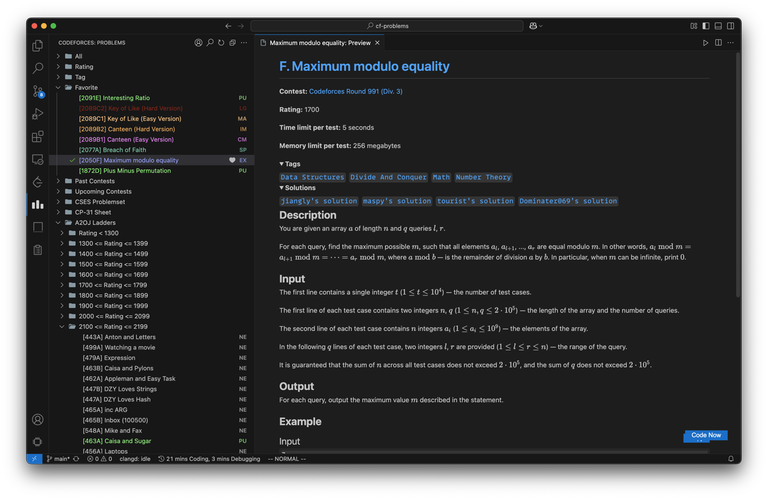
- Codeforces Integration: Browse problems by rating, tags, or contests. View upcoming contests too.
- Sort problems: You can sort problems by solved count or contest order
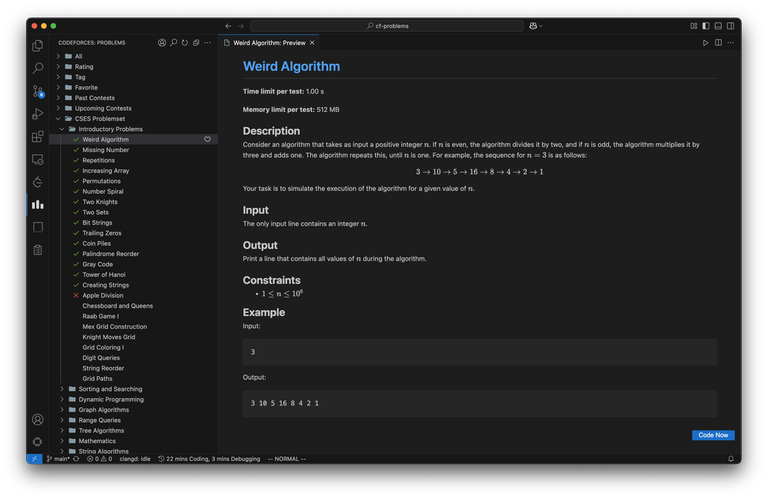
- CSES Problem Set: Access the entire CSES problem set within VS Code.
- CP Sheets: Includes CP-31 and A2OJ ladders for structured practice.
- Color-Coded Problems: Problems are color-coded based on their rating, similar to Codeforces user profiles.
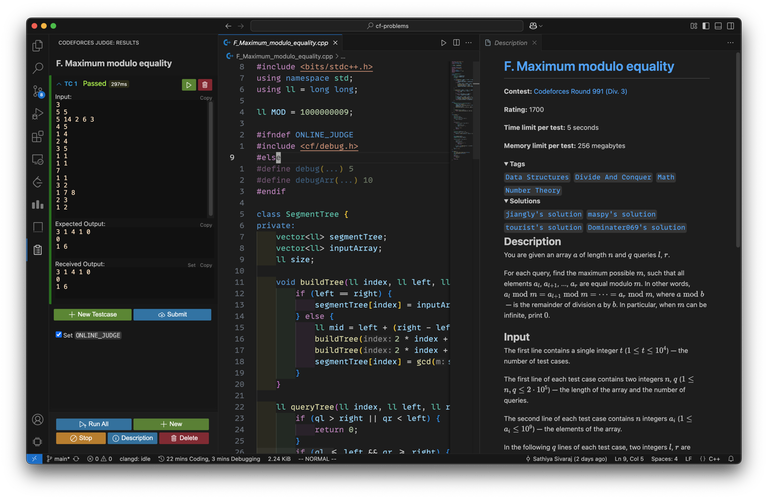
- In-Editor Problem Descriptions: View problem statements, input/output specs, sample test cases, tags directly in VS Code.
- Integrated Testing and Submission: Built-in testing and submission functionalities using code copied from CPH extension(thanks to d-agrawal (no need to install CPH separately)
- Solution Links: In the problem view, you'll see solution links from a few selected Codeforces handles—only if they've solved the problem. You can customize which handles you want to see solutions from.
- Favorite Problems: You can mark any problem as a favorite, and it'll be saved under a dedicated "Favorites" folder for quick access later.
- Pick random problem: You can pick a random problem — either completely random or filtered by a chosen rating.
- Browser Extension for Submissions: Install "CPH Submit Pro" from the Chrome Web Store or Firefox Add-ons to submit problems to codeforces and CSES, and sync CSES problem statuses.
Preview
Setup:
- Install the Codeforces Pro extension from the Visual Studio Marketplace.
- Install the CPH Submit Pro(chrome or firefox) browser extension.
Give it a try and let me know what you think. Feedback and suggestions are welcome!
Note: Due to the recent mandatory v3 manifest in Chrome, the Chrome extension submit feature sometimes works improperly. Firefox works without any issues. Please use Firefox temporarily, and I’ve made the fix and published it. It’s currently under review. Once it passes the review, you can use the Chrome extension.
Update: New version for chrome extension published, and should work without any issue


this looks so cool!! cant wait to try it
Make some for safari bro :(
Exactly, I work on Xcode because VSCode doesn't really seem to work on my Mac. It always throws some error and launches a json file. It is very frustrating. Can you suggest some ideas to make it work??
Installing gcc through brew and setting the default compile option to gcc or g++ from apple clang++ works for me. However from time to time whenever the mac gets an update, gcc simply starts malfunctioning. Then you will need to put in some time to reconfigure some stuff. Mostly uninstalling and reinstalling gcc works.
same
Yes after every update the bits file just vanishes. Then, I thought of a solution, I just copied it, stored in a different folder and now when the mac gets updated nothing changes. That's why I don’t have to do that everytime. You can try it too.
only reason i dont use it is because of ui/color of those buttons. But great job!
Is there a vscode version requirement? Mine is saying that the extension is incompatible with vscode version 1.81.1
That's like 2 years old at this point. You should update it.
Good work!
Does it allow you to participate in contests via VSCode?
During contest, you cannot see contest problems in vscode extension. However, you can get problem details like testcases (not problem description) to vscode using "Competitive Companion" browser extension and solve it in vscode and test and submit it directly from vscode.
cool extension but when i hover over a cf problem it shows tag.there should be option to disable it or remove it completely
Makes sense. I will add a configuration to disable tags this weekend
Never saw any extension this much helpful before. Thanks for this.
I have a suggestion, and that is to add a feature to open a problem (with statement in right side, like what happens when we open a problem using this extension) from the browser.
Thanks again.
OK, understood. I will try to implement this. Meanwhile, what you can do is, after opening the problem in VSCode using the browser, you can click on the "Description" button on the judge panel, which will open the statement on the right side.
how to auto submit code i have installed these 2 extensions then i click on code now and submit , but does not work for me, might be doing in the wrong way , please help me if someone knows the right way.
thanks
Can you uninstall the extension on Chrome and try it on Firefox? In Chrome, it sometimes doesn't work due to Manifest v3, which Google made mandatory recently.
yeah working in fireforx , auto submit dont work in chrome ,right?
Sometimes we use websites for learning, so it would be great to have a mini browser in VS Code also.
Sometimes we goon, so it would be great to have a mini r34 in VS code also
XDDDDDDD
can you please elaborate a bit upon the setup? Like what exactly should I do after installing the 2 extensions? Can't seem to find any visible queues for what to do just after install
if you want to submit ur code then user firefox ,will not work in chrome
After installing, you can find the Codeforces icon on the left side of the Activity Bar. If you don't see it, it might be because you have many extensions and it is hidden. In that case, right-click on the Activity Bar, and select "Codeforces" and "Codeforces Judge" from the menu to make them visible.
very useful
Very good efforts .... It really made atleast my life easy bhai..
Love this bro!
I have used it for a while. Really helpful! Vote it!
Will it add gym problems in it? Or rather, because there are too many problems in gym, it won't add?
No, only problems from problemset are available
Ok, but it is enough for me now.
Yeah.Thank you for your work
And I want to add auto problem translation
Does it work for leetcode?
I made another extension for leetcode called "leetnotion". You can search for it in vscode extensions marketplace.
Great extension btw, hats off man!
CSES problems cannot be viewed . Also some cf problems takes me to website screenshot some are partially viewed ss
How do i disable the Integrated Testing and Submission? I want to edit this section of CPH Helper
"cph.general.wordRegex": ".+"which prevents from changing the filename from original to '_' seperated words