Hello! Today I'm going to show you how to debug with colors in your lovely console ( ^◡^)
I'm sowwy if my engwish is bad (⁄ ⁄>⁄ω⁄<⁄ ⁄)⁄
First Step: wet's see huw it wurksss (*ゝω・)ノ 🍎🍌🍀📘
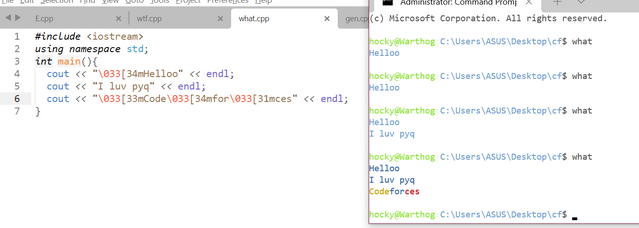
Okay, so first things first, our terminal has it's own way to interpret color. It basically will escape a certain kind of stuffs and it will interpret it as color for the next stream.
Pwease see this code: 💖💖
Code UωU#include <iostream>
using namespace std;
int main(){
cout << "\033[34mHelloo" << endl;
cout << "I luv pyq" << endl;
cout << "\033[33mCode\033[34mfor\033[31mces" << endl;
}
2nd Step: wet's make a cwass!
If we wunt to use itt.. Let's make it really easy for us to use!
ColorDebugger Class UωU#include <iostream>
using namespace std;
#define endl '\n'
namespace Color {
enum Code {
FG_RED = 31,
FG_GREEN = 32,
FG_YELLOW = 33,
FG_BLUE = 34,
FG_DEFAULT = 39
};
class ColorDebugger {
Code code;
public:
ColorDebugger(Code pCode) : code(pCode) {}
template <class T>
ColorDebugger& operator<<(const T &other) {
cout << "\033[" << code << "m" << other << "\033[" << FG_DEFAULT << "m";
return *this;
}
};
}
using namespace Color;
ColorDebugger ycout(FG_YELLOW);
ColorDebugger rcout(FG_RED);
ColorDebugger bcout(FG_BLUE);
ColorDebugger gcout(FG_GREEN);
int main(){
ycout << "Hello, I'm a cookie monster!" << endl;
rcout << "Yes, I'm a cookie cookie cute monster" << endl;
bcout << "What am I doing" << endl;
gcout << "how to be as good as {name} orzzzzz" << endl;
}
Pay attention that I defined endl as \n because we 💗 codeforces. Just kidding, that's because std::endl is a weird stuff that can't be defined with simple generics, and it's really weird, endl is more like a function (it's not but just take it for granted). Next, we got this implementation without defining endl as \n.
ColorDebugger Class Finish UωU#include <iostream>
using namespace std;
namespace Color {
enum Code {
FG_RED = 31,
FG_GREEN = 32,
FG_YELLOW = 33,
FG_BLUE = 34,
FG_DEFAULT = 39
};
class ColorDebugger {
Code code;
public:
ColorDebugger(Code pCode) : code(pCode) {}
template <class T>
ColorDebugger& operator<<(const T &other) {
cout << "\033[" << code << "m" << other << "\033[" << FG_DEFAULT << "m";
return *this;
}
ColorDebugger& operator<<(ostream&(*pManip)(ostream&)){
(*pManip)(cout);
return *this;
}
};
}
using namespace Color;
ColorDebugger ycout(FG_YELLOW);
ColorDebugger rcout(FG_RED);
ColorDebugger bcout(FG_BLUE);
ColorDebugger gcout(FG_GREEN);
int main(){
ycout << "Hello, I'm a cookie monster!" << endl;
rcout << "Yes, I'm a cookie cookie cute monster" << endl;
bcout << "What am I doing" << endl;
gcout << "how to be as good as {name} orzzzzz" << endl;
cout << "Hooray" << endl;
}
Step 三
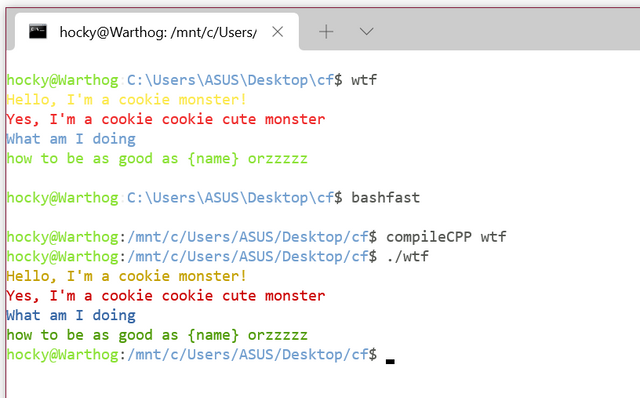
Let's see this in action:
Input is in the color dark and output is blue Beside windows, linux terminal has the same syntax, I awso have twied it.
Don't be confused with bashfast and compileCPP it's basically an alias I've made to access my WSL (Windows Subsystem fow Winux) and to compile C++ code.
ありがとう~! 🐾
I use light mode because it's cwuteeee UωU~~!! 🐾 🐾




N-nice tutowial UωU
Downvoted because of light theme
Upvoted because of light theme
Upvoted because Aeren upvoted.
Light mode UωU 💖💕💓💘💞💝
UωU
UwU <3
(/ =ω=)/ kawaii
Really useful! I'll probably spend the next decade playing with all the different colours.
send me the compensation, my eyes are bleeding cuz you showed me the light theme without any warning.
╚(•⌂•)╝
uwu twice if you need help
Cool trick UwU
It's so pretty uwu
Dark mode user can't enjoy this
Offtopic:
How you all are inserting emojis? When I try to copy paste the same and preview, it says:
Comment preview error:
Emoji (and other unusual UTF-8 characters) are not supported
😀 =
😀search
html emoji codesWhat if I want to do the same on Window?
https://github.com/ikalnytskyi/termcolor
colorblinds : 😑
I would also suggest a simpler trick, though it is less powerful (you cannot decide to print one thing red and the other thing blue, but it works if you want to separate input and output). You can make an alias x="./a.out | lolcat" and run your code with x; you will have rainbow output.
So useful. Those colors will help me debug faster
This stackoverflow answer might also be useful to people: https://stackoverflow.com/questions/287871/how-to-print-colored-text-to-the-terminal
In particular the python library rich really shows off what you can do with this stuff.
sir what does "uwu" and all the chinese/japanase letter mean?????