


CF Performance Mirror is a lightweight Chrome extension that shows contest-wise average & median solve times (per index A, B, C…) and high WA% topics directly on Codeforces profile pages. Compact, non-intrusive, and reads only public CF APIs. Install → open any profile → get contest timing + friction insights.↵
↵
#### **Why I built this**↵
↵
When preparing for contests I kept asking: Which problem types slow me down? How long do I actually take on an A/B/C?↵
CF Performance Mirror surfaces those answers right on the profile, so you can focus training where it helps most.↵
↵
#### **Key features (quick)**↵
↵
1. Per-index timing: average & median solve time (minutes) per problem index (A, B, C…).↵
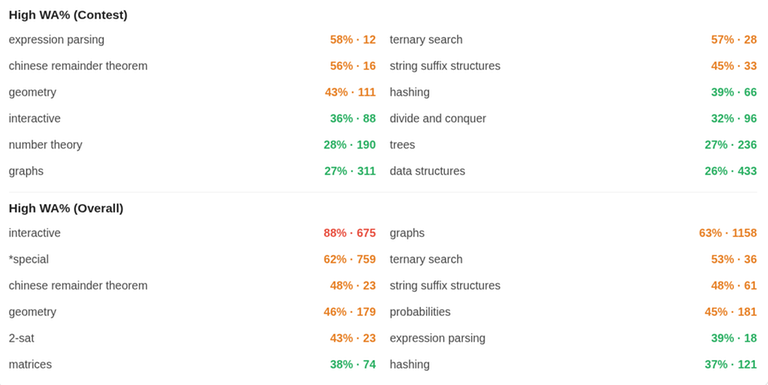
2. High WA% topics: topics ranked by wrong-attempt percentage (contest / overall).↵
3. Modes: Total / Rated / Unrated contests — view timings separately.↵
4. Compact UI: anchored under the profile area (like other CF widgets), non-blocking.↵
5. Privacy first: client-side script only reads public CF APIs (user.status, contest.list, user.rating). No personal 6. data collected or sent to servers.↵
↵
**UI preview of CF Performance Mirror on a user profile**↵
↵
↵
↵
***Shows contest-wise timings***↵
↵
↵
↵
***Shows contest-wise and global WA% analysis***↵
↵
↵
#### **How to use**↵
↵
1. Install the extension from the Chrome Web Store https://chromewebstore.google.com/detail/cf-performance-mirror/lpbkkcofbkmghobeeeipbdgohbckcdgj.↵
2. Open any Codeforces profile: https://mirror.codeforces.com/profile/<handle>↵
3. Scroll to the profile area — the CF Performance Mirror card loads under the existing widgets.↵
4. Toggle Div categories and Total/Rated/Unrated to compare. Click a WA% topic to note weak areas.↵
↵
↵
↵
↵
#### **Short privacy note**↵
↵
CF Performance Mirror only accesses public Codeforces API endpoints to read profile/submission/contest metadata. It does not collect, store, or transmit personal data to any server. All analysis runs client-side in your browser.↵
↵
#### **Feedback & Suggestions**↵
↵
If you have any suggestions, feature requests, or notice any issues, please let me know in the comments.↵
↵
GitHub: https://github.com/your-username/cf-performance-mirror↵
↵
Your feedback will help me improve and upgrade this extension for everyone.↵
↵
↵
↵
↵
#### **Why I built this**↵
↵
When preparing for contests I kept asking: Which problem types slow me down? How long do I actually take on an A/B/C?↵
CF Performance Mirror surfaces those answers right on the profile, so you can focus training where it helps most.↵
↵
#### **Key features (quick)**↵
↵
1. Per-index timing: average & median solve time (minutes) per problem index (A, B, C…).↵
2. High WA% topics: topics ranked by wrong-attempt percentage (contest / overall).↵
3. Modes: Total / Rated / Unrated contests — view timings separately.↵
4. Compact UI: anchored under the profile area (like other CF widgets), non-blocking.↵
5. Privacy first: client-side script only reads public CF APIs (user.status, contest.list, user.rating). No personal 6. data collected or sent to servers.↵
↵
**UI preview of CF Performance Mirror on a user profile**↵
↵
↵
↵
***Shows contest-wise timings***↵
↵
↵
↵
***Shows contest-wise and global WA% analysis***↵
↵
↵
#### **How to use**↵
↵
1. Install the extension from the Chrome Web Store https://chromewebstore.google.com/detail/cf-performance-mirror/lpbkkcofbkmghobeeeipbdgohbckcdgj.↵
2. Open any Codeforces profile: https://mirror.codeforces.com/profile/<handle>↵
3. Scroll to the profile area — the CF Performance Mirror card loads under the existing widgets.↵
4. Toggle Div categories and Total/Rated/Unrated to compare. Click a WA% topic to note weak areas.↵
↵
↵
↵
↵
#### **Short privacy note**↵
↵
CF Performance Mirror only accesses public Codeforces API endpoints to read profile/submission/contest metadata. It does not collect, store, or transmit personal data to any server. All analysis runs client-side in your browser.↵
↵
#### **Feedback & Suggestions**↵
↵
If you have any suggestions, feature requests, or notice any issues, please let me know in the comments.↵
↵
GitHub: https://github.com/your-username/cf-performance-mirror↵
↵
Your feedback will help me improve and upgrade this extension for everyone.↵
↵
↵
↵


