


CF Performance Mirror is a lightweight Chrome extension that shows contest-wise avg/median solve times (A, B, C…) and high WA% topics on Codeforces profiles, with time-based filters for performance analysis. Compact, non-intrusive, and uses only public CF APIs.↵
↵
#### **Why I built this**↵
↵
When preparing for contests I kept asking: Which problem types slow me down? How long do I actually take on an A/B/C?↵
CF Performance Mirror surfaces those answers right on the profile, so you can focus training where it helps most.↵
↵
#### **Key features (quick)**↵
↵
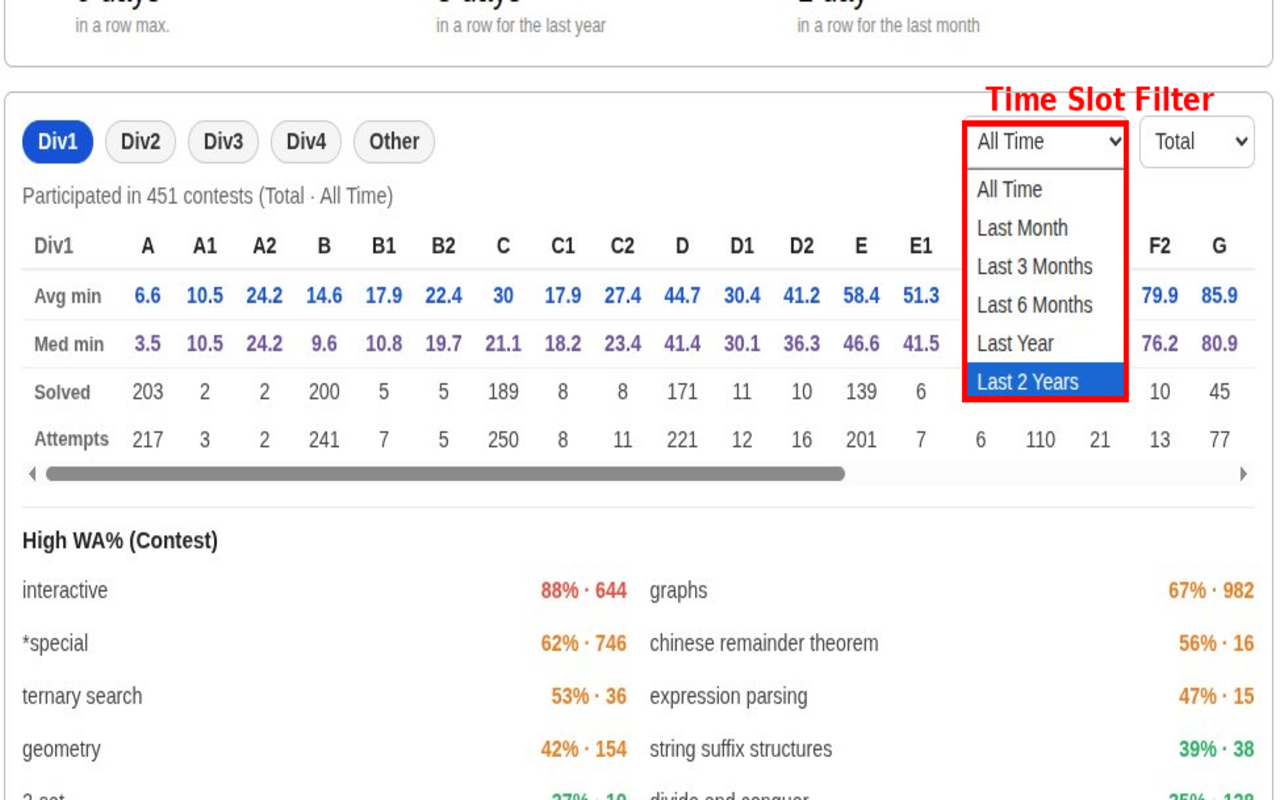
1. Per-index timing: average & median solve time (minutes) per problem index (A, B, C…).↵
2. High WA% topics: topics ranked by wrong-attempt percentage (contest / overall).↵
3. Time-based filters — Track solving speed and WA% across ranges like All Time, Last Month, and Last Year.↵
3. Modes: Total / Rated / Unrated contests — view timings separately.↵
4. Compact UI: anchored under the profile area (like other CF widgets), non-blocking.↵
5. Privacy first: client-side script only reads public CF APIs (user.status, contest.list, user.rating).↵
6. Adaptive UI — Automatically adjusts theme and colors for a smoother, personalized experience.↵
7. No personal data collected or sent to servers.↵
↵
_UI preview of CF Performance Mirror on a user profile_↵
↵
↵
↵
***Shows contest-wise timings***↵
↵
↵
↵
***Shows contest-wise and global WA% analysis***↵
↵
↵
#### **How to use**↵
↵
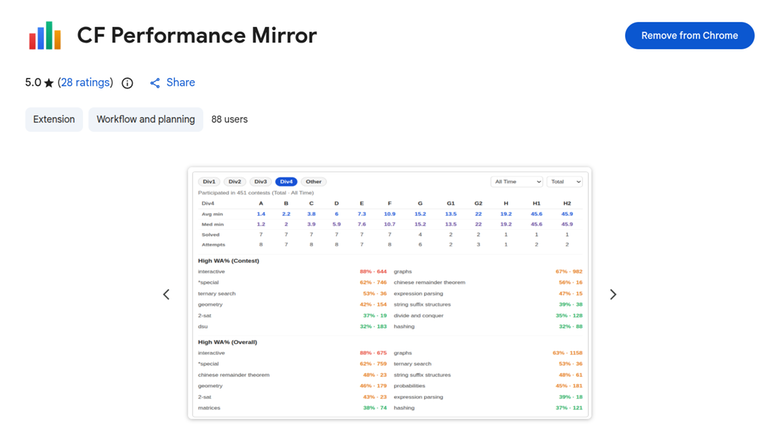
1. [Download from Chrome Web Store](https://chromewebstore.google.com/detail/cf-performance-mirror/lpbkkcofbkmghobeeeipbdgohbckcdgj)↵
_OR_↵
[Download from Firefox Add-ons](https://addons.mozilla.org/en-US/firefox/addon/cf-performance-mirror/?utm_source=addons.mozilla.org&utm_medium=referral&utm_content=search)↵
↵
2. Open any Codeforces profile: https://mirror.codeforces.com/profile/<handle>↵
3. Scroll to the profile area — the CF Performance Mirror card loads under the existing widgets.↵
4. Toggle Div categories and Total/Rated/Unrated to compare. Click a WA% topic to note weak areas.↵
↵
↵
↵
↵
#### **Some Clarifications**↵
↵
1. For combined Div1 + Div2 contests (including global contests), the system classifies your participation based on your division—Div2 participants are counted under Div2, and Div1 participants under Div1.↵
↵
2. All special contest types (such as “Good Bye 2025, Hello 2026”) will be shown under the Other section in statistics.↵
↵
#### **Short privacy note**↵
↵
CF Performance Mirror only accesses public Codeforces API endpoints to read profile/submission/contest metadata. It does not collect, store, or transmit personal data to any server. All analysis runs client-side in your browser.↵
↵
#### **Feedback & Suggestions**↵
↵
If you have any suggestions, feature requests, or notice any issues, please let me know in the comments.↵
↵
GitHub: https://github.com/perxeusss/cf-performance-mirror↵
↵
Your feedback will help me improve and upgrade this extension for everyone.↵
↵
↵
↵
↵
#### **Why I built this**↵
↵
When preparing for contests I kept asking: Which problem types slow me down? How long do I actually take on an A/B/C?↵
CF Performance Mirror surfaces those answers right on the profile, so you can focus training where it helps most.↵
↵
#### **Key features (quick)**↵
↵
1. Per-index timing: average & median solve time (minutes) per problem index (A, B, C…).↵
2. High WA% topics: topics ranked by wrong-attempt percentage (contest / overall).↵
3. Time-based filters — Track solving speed and WA% across ranges like All Time, Last Month, and Last Year.↵
3. Modes: Total / Rated / Unrated contests — view timings separately.↵
4. Compact UI: anchored under the profile area (like other CF widgets), non-blocking.↵
5. Privacy first: client-side script only reads public CF APIs (user.status, contest.list, user.rating).↵
6. Adaptive UI — Automatically adjusts theme and colors for a smoother, personalized experience.↵
7. No personal data collected or sent to servers.↵
↵
_UI preview of CF Performance Mirror on a user profile_↵
↵
↵
↵
***Shows contest-wise timings***↵
↵
↵
_OR_↵
[Download from Firefox Add-ons](https://addons.mozilla.org/en-US/firefox/addon/cf-performance-mirror/?utm_source=addons.mozilla.org&utm_medium=referral&utm_content=search)↵
↵
2. Open any Codeforces profile: https://mirror.codeforces.com/profile/<handle>↵
3. Scroll to the profile area — the CF Performance Mirror card loads under the existing widgets.↵
4. Toggle Div categories and Total/Rated/Unrated to compare. Click a WA% topic to note weak areas.↵
↵
↵
↵
↵
#### **Some Clarifications**↵
↵
1. For combined Div1 + Div2 contests (including global contests), the system classifies your participation based on your division—Div2 participants are counted under Div2, and Div1 participants under Div1.↵
↵
2. All special contest types (such as “Good Bye 2025, Hello 2026”) will be shown under the Other section in statistics.↵
↵
#### **Short privacy note**↵
↵
CF Performance Mirror only accesses public Codeforces API endpoints to read profile/submission/contest metadata. It does not collect, store, or transmit personal data to any server. All analysis runs client-side in your browser.↵
↵
#### **Feedback & Suggestions**↵
↵
If you have any suggestions, feature requests, or notice any issues, please let me know in the comments.↵
↵
GitHub: https://github.com/perxeusss/cf-performance-mirror↵
↵
Your feedback will help me improve and upgrade this extension for everyone.↵
↵
↵
↵


