


CF Performance Mirror is a lightweight Chrome extension that shows contest-wise avg/median solve times (A, B, C…) and high WA% topics on Codeforces profiles, with time-based filters for performance analysis. Compact, non-intrusive, and uses only public CF APIs.
Why I built this
When preparing for contests I kept asking: Which problem types slow me down? How long do I actually take on an A/B/C? CF Performance Mirror surfaces those answers right on the profile, so you can focus training where it helps most.
Key features (quick)
- Per-index timing: average & median solve time (minutes) per problem index (A, B, C…).
- High WA% topics: topics ranked by wrong-attempt percentage (contest / overall).
- Time-based filters — Track solving speed and WA% across ranges like All Time, Last Month, and Last Year.
- Modes: Total / Rated / Unrated contests — view timings separately.
- Compact UI: anchored under the profile area (like other CF widgets), non-blocking.
- Privacy first: client-side script only reads public CF APIs (user.status, contest.list, user.rating).
- Adaptive UI — Automatically adjusts theme and colors for a smoother, personalized experience.
- No personal data collected or sent to servers.
UI preview of CF Performance Mirror on a user profile

Shows contest-wise timings
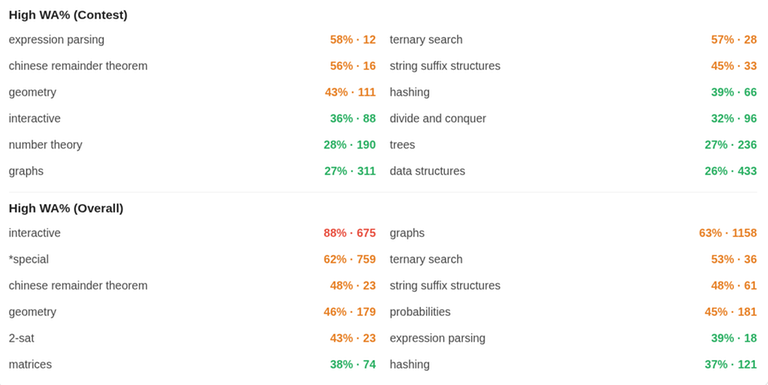
Shows contest-wise and global WA% analysis
How to use
Download from Chrome Web Store OR Download from Firefox Add-ons
Open any Codeforces profile: https://mirror.codeforces.com/profile/
- Scroll to the profile area — the CF Performance Mirror card loads under the existing widgets.
- Toggle Div categories and Total/Rated/Unrated to compare. Click a WA% topic to note weak areas.

Some Clarifications
For combined Div1 + Div2 contests (including global contests), the system classifies your participation based on your division—Div2 participants are counted under Div2, and Div1 participants under Div1.
All special contest types (such as “Good Bye 2025, Hello 2026”) will be shown under the Other section in statistics.
Short privacy note
CF Performance Mirror only accesses public Codeforces API endpoints to read profile/submission/contest metadata. It does not collect, store, or transmit personal data to any server. All analysis runs client-side in your browser.
Feedback & Suggestions
If you have any suggestions, feature requests, or notice any issues, please let me know in the comments.
GitHub: https://github.com/perxeusss/cf-performance-mirror
Your feedback will help me improve and upgrade this extension for everyone.


