


🚀 New Tool: Codeforces Division Filter for Problemset (Div. 1, Div. 2, Educational & More!)
Hello Codeforces!
Have you ever wanted to easily practice specific types of rounds like only Div. 2, only Educational Rounds, or only Div. 3 on the Problemset page, but found it annoying that there is no native way to filter them?
I've built a Browser Extension / Tampermonkey Script that fixes this!
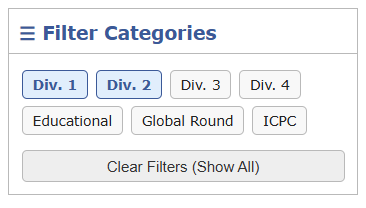
Features
- Multi-Select Filtering: You can select multiple categories at once (e.g., check both "Div. 2" and "Educational" to see problems from either).
- OR Logic: If a problem belongs to any of your selected categories, it stays visible.
- Memory Status: It securely saves your filter preferences so they remain active even if you refresh or switch to another page in the problemset!
How to Install (Two Methods)
I've provided this tool in two ways: as a Tampermonkey Userscript and as a Chrome Extension ZIP.
Method 1: The Tampermonkey Script (Easiest)
- Install the Tampermonkey extension for your browser.
- Important for All Browsers: Due to modern browser security restrictions (like Manifest V3), you must go to your browser's specific Extensions settings page (e.g.,
chrome://extensions/), turn on Developer Mode, and click "Details" on Tampermonkey to explicitly toggle "Allow userscripts" (or "Allow access to file URLs"). Without this, Tampermonkey scripts might not run! - Install from Greasy Fork: Click the Greasy Fork link in the Links section below and click "Install". Tampermonkey should automatically pop up and prompt you to install it.
- (Fallback) If auto-install doesn't work: Open the Greasy Fork script code (or the
userscript.jsfile from GitHub), select all, and copy the entire code. Then click the Tampermonkey icon in your browser, select "Create a new script...", completely delete all the default template code it shows you, paste the code you just copied, and finally hitCtrl+S(or File -> Save) to save it. - Go to the Problemset page and you'll see the filter box on the right!
Method 2: The Chrome Extension (ZIP)
If you prefer standalone extensions without Tampermonkey: 1. Download the extension ZIP file and extract it to a folder. 2. Go to your browser's Extensions page (e.g., chrome://extensions/ in Chrome). 3. Turn on Developer mode (usually a toggle in the top right corner). 4. Click "Load unpacked" and select the folder you extracted. 5. You're done!
Links & Downloads
I hope this tool helps streamline your CP training! Let me know in the comments if you encounter any bugs or have feature requests. Happy coding!
Note : If anyone wants to publish the chrome extension they may feel free to do so i just didnt wanna pay 5$ lol, i can include the link in this blog later


