Wallbreaker5th's blog

By Wallbreaker5th, history, 13 months ago, In English

Polyhedron Site

Hello Codeforces community,

Are you passionate about competitive programming problems but find the creation process tedious? From writing problem statements to generating test data and solutions, setting problems is a lot of work.

Introducing Polyhedron (http://polyhedron.wallbreaker5th.top/), a new AI-powered platform designed to streamline and enhance competitive programming problem creation.

Polyhedron aims to make problem setting significantly faster and more efficient. Imagine having intelligent assistance for:

  • Problem Statement Expansion: Develop detailed, well-formatted problem statements from initial ideas.
  • Solution Generation: Automatically create standard solutions and presentation materials.
  • Multi-Language Material Generation: Generate solutions, checkers, validators, and interactors in multiple languages.
  • Incorrect Solution Generation: Generate common incorrect solutions for robust testing.
  • Data Generator & Validator Creation: Build and validate strong test data sets.
  • Export & Integration: Export problems for various platforms like CMS, UOJ, and Polygon.

Polyhedron is designed to empower the community to create better and more diverse problems. We believe it can lower the barrier to problem creation and foster greater creativity.

Interested in the future of problem creation? Visit our site to learn more: http://polyhedron.wallbreaker5th.top/

We welcome your feedback and questions!

Full text and comments »

  • Vote: I like it
  • +124
  • Vote: I do not like it

By Wallbreaker5th, history, 20 months ago, In English

tl;dr: https://giraphe.netlify.app/

(Passage translated by Claude)

Graph theory is an important topic in competitive programming, and we often need to insert graph images in problem statements, solutions, and blog posts to make explanations clearer and more intuitive. So, what are the common approaches to drawing graphs?

  • MS Paint school: The positions of vertices, edges, and text are determined by hand tremors, making it difficult to maintain a consistent style. Lines, circles, and other shapes lack anti-aliasing.
  • CSAcademy school: Using the Graph Editor, specifically designed for graph theory, it automatically adjusts vertex positions to make the graph clear and intuitive. However, it's difficult to customize individual vertex and edge styles or precisely set vertex positions. The exported bitmap resolution is also low.
  • Typesetting language school: Using packages in LaTeX/Typst to draw graphs, allowing precise positioning and consistent styling, resulting in high-quality vector or bitmap images. However, drawing with code is not very intuitive.
  • PowerPoint school: Allows free adjustment of vertex and edge styles, and uses alignment and snapping to adjust vertex positions. Can produce high-quality vector or bitmap images. However, as the number of vertices and edges increases, the snapping positions become less useful. Adjusting edge endpoints is also inconvenient.
  • Various other niche approaches.

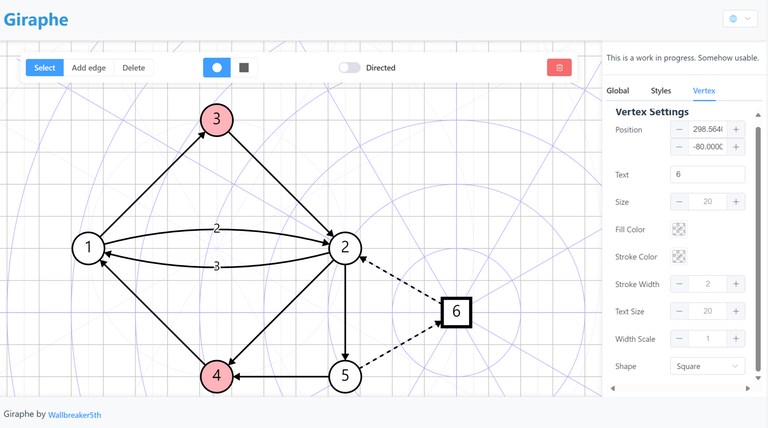
As we can see, existing graph drawing solutions have their pros and cons, making it difficult to meet all user needs. To address this, I've created a new graph drawing tool called Giraphe (https://giraphe.netlify.app/). While this project still has room for improvement, it can already satisfy many use cases. Feel free to try it out!

Giraphe

Its main features include:

  • Basic creation of vertices and connecting directed/undirected edges
  • Edge labels
  • Curved edges
  • Vertex alignment with grids (absolute or relative to another vertex)
  • Various style settings
  • Saving and loading created graphs
  • Exporting to SVG

(Note: Indeed, it cannot automatically generate graphs from textual descriptions. It's primarily designed for users who already have a clear structure in mind and want to use human intuition to create visually appealing layouts and drawings.)

Full text and comments »

  • Vote: I like it
  • +37
  • Vote: I do not like it