


Hello everyone!
I built a Chrome extension that helps you filter your problems on Codeforces by tags, verdict, date and rating range.
Problem
While practicing on Codeforces, I felt that there is no direct way to:
- View problems by specific tags
- Filter problems based on when they were solved
- Analyze submissions based on verdict (AC, WA, etc.)
- Explore problem-solving patterns of top competitive programmers
This makes revision, topic-wise practice, and analysis a bit inconvenient.
Solution
So I built a Chrome extension that adds these features directly to the submissions page.
It integrates seamlessly with the existing Codeforces UI and allows you to filter and analyze problems efficiently.
Features
- Filter problems by tags
- Filter by verdict (AC, WA, TLE, etc.)
- Date range filtering
- Rating range filtering (min–max)
- Shows number of problems
- Displays problem ratings
- Sort problems by rating (ascending / descending toggle)
- Clean UI integrated with Codeforces
- Works on both light & dark mode (including Dark Reader)
Where it works
- Codeforces Submissions Page
Screenshots
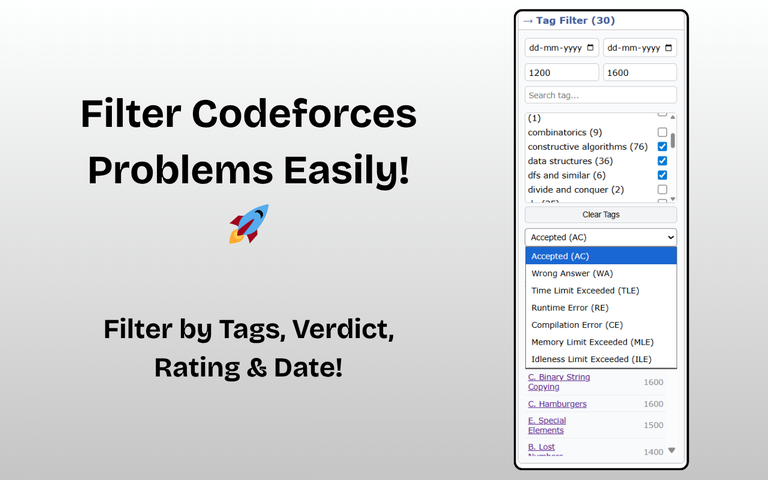
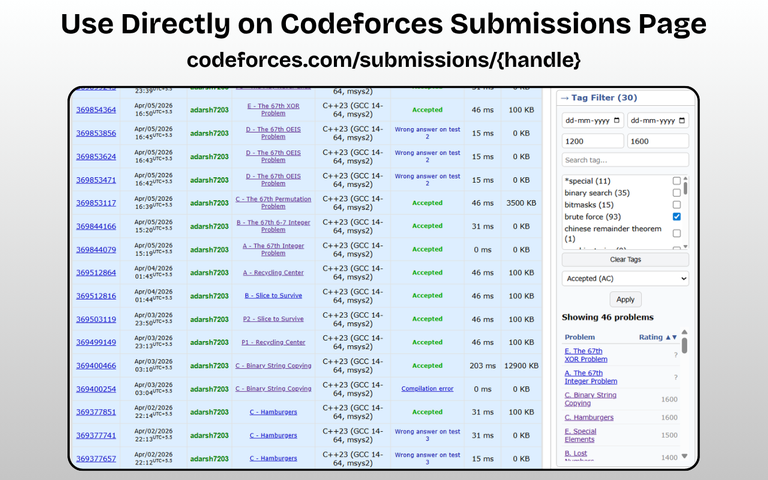
How to Use
- Install the extension from Chrome Web Store
- Open your submissions page:
https://mirror.codeforces.com/submissions/your_handle - Select tags, verdict, rating, date, etc.
- Click Apply
- View filtered problems instantly
Download
You can download the extension here:
https://chromewebstore.google.com/detail/cf-tag-filter/ehnihgbkpckfocoocnoghemdonahhnib
Use Case
- Revise problems topic-wise
- Track weak areas
- Analyze your own practice
- Explore how top competitive programmers solve problems
Links
Codeforces Profile: https://mirror.codeforces.com/profile/adarsh7203
LinkedIn Post: https://www.linkedin.com/posts/adarsh7203_codeforces-chromeextension-webdevelopment-activity-7448390181361033216-8R7g
Feedback
I would really appreciate your feedback and suggestions!
If you find this useful, please consider upvoting.
Thank you!


