


I'm facing this error while importing this file in order to use ordered set, How can I fix it? 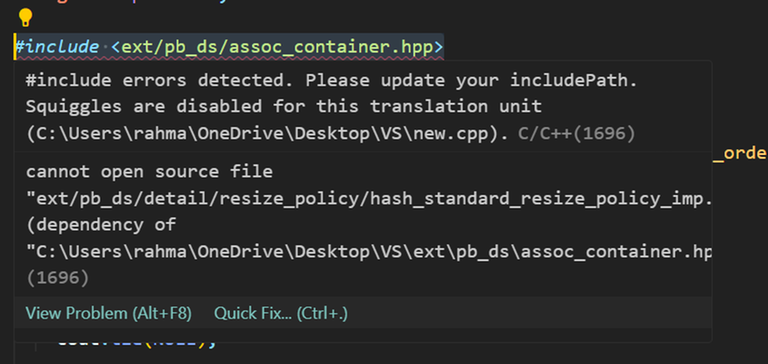
→ Pay attention
Before contest
Codeforces Round 1097 (Div. 1, Based on Zhili Cup 2026)
3 days
Register now »
Codeforces Round 1097 (Div. 1, Based on Zhili Cup 2026)
3 days
Register now »
*has extra registration
Before contest
Codeforces Round 1097 (Div. 2, Based on Zhili Cup 2026)
3 days
Register now »
Codeforces Round 1097 (Div. 2, Based on Zhili Cup 2026)
3 days
Register now »
*has extra registration
→ Streams
→ Top rated
| # | User | Rating |
|---|---|---|
| 1 | Benq | 3792 |
| 2 | VivaciousAubergine | 3647 |
| 3 | Kevin114514 | 3603 |
| 4 | jiangly | 3583 |
| 5 | strapple | 3515 |
| 6 | tourist | 3470 |
| 7 | dXqwq | 3436 |
| 8 | Radewoosh | 3415 |
| 9 | Otomachi_Una | 3413 |
| 10 | Um_nik | 3376 |
→ Top contributors
| # | User | Contrib. |
|---|---|---|
| 1 | Qingyu | 158 |
| 2 | adamant | 152 |
| 3 | Proof_by_QED | 146 |
| 3 | Um_nik | 146 |
| 5 | Dominater069 | 144 |
| 6 | errorgorn | 141 |
| 7 | cry | 139 |
| 8 | YuukiS | 135 |
| 9 | chromate00 | 134 |
| 9 | TheScrasse | 134 |
→ Find user
→ Recent actions


Codeforces (c) Copyright 2010-2026 Mike Mirzayanov
The only programming contests Web 2.0 platform
Server time: May/03/2026 21:08:21 (g2).
Desktop version, switch to mobile version.
Supported by


Lol, I had this question as well, and nobody ever replied to my blog :/. However to start off, you need a GCC compiler.
If you use win 7, 8, 10 or 11 and you have Mingw (is the compiler for c++ ):-
Fix go to the dir -> C:\MinGW\lib\gcc\mingw32\8.2.0\include\c++\ext\pb_ds\detail\resize_policy
There u will see a file similar to -> "hash_standard_resize_policy_imp.hpp0000644"
Rename it to hash_standard_resize_policy_imp.hpp
and now it worked (I hope <3 )
thanks:) It's working
Can anyone please recommend something to make it work on a MacBook with a M series chip
For Macs, just download GCC from home-brew, that is how it worked for me and change your compiler to gcc in your preferred IDE, it may still show error for bits/stdc++.h and ordered set libraries when importing but the code will compile for you, to fix the linter you will have to go through a lot of trouble which I dont believe is necessary.
You will be needing a GCC Compiler (you can use MinGW or something)