


Welcome to the guide on how to install and use the "My Codeforces Journal" Chrome extension! This extension helps Codeforces users easily track and log the problems they have solved by storing the details directly into a Google Spreadsheet. ( If you install this extension do let me know in the comments : ) )
I am not adding this on the chrome store, because Google charges $5 for that (╥﹏╥)
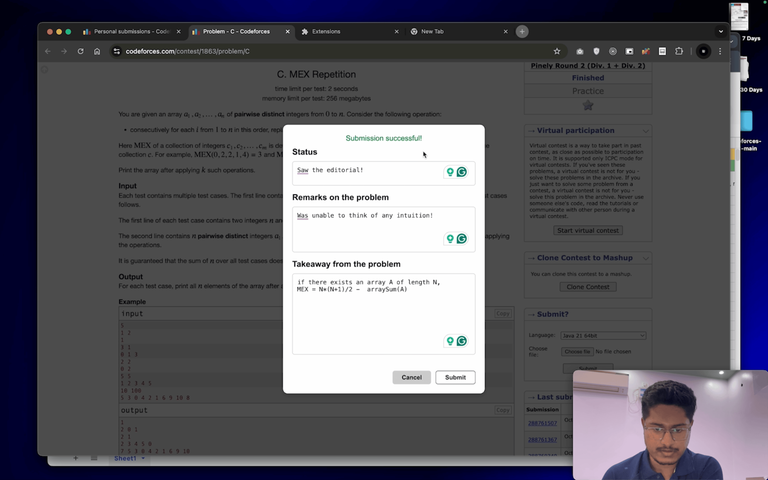
Follow the steps outlined in this video to get started.
Links:
Please give a star to this repository : )
Extension Repository: My-Codeforces-Journal
To contribute to this extension: My-Codeforces-Journal-Development
Video Guide to this extension: Video
Features:
Few-click Storage: Easily save the current Codeforces problem with a single click.
Spreadsheet Integration: Link your own Google Spreadsheet to store and organize problems.
Problem Details: Stores key information such as problem URL, name, and rating.
Installation Steps:
- Check out: My Codeforces Journal
Usage:
- Open any Codeforces problem page.
- After solving the problem, click the extension icon and then "Add Problem."
- Fill in the form and submit to save the details to your spreadsheet.
Common Errors & Solutions:
- "Error! Something bad happened!": Ensure the Codeforces ID is correct.
- "APPSCRIPT NOT FOUND!": Verify the AppScript URL and authorization.
- "Solve the problem first, then submit!": Make sure the problem is recently solved within the last 40 submissions.
For more detailed instructions and troubleshooting, refer to the README file in the repository My Codeforces Journal.
UPD:
- I have added a new feature to this extension
The new update adds the following feature:
- Feature to update the problem details of problems already added to your spreadsheet
Requirements for this new update:
- Use updated AppScript
- New Version of chrome-extension
If you are already using this extension:
- First, thank you very much!
- Second, you can watch the video here V 1.1.0


This is really cool!
Is it possible to add support for multiple sheets? ie. something like a dropdown menu which will allow you to specify which sheet to save the entry for a particular problem to.
Thanks (ꈍᴗꈍ) ! Well yeah it is possible to add a feature like this. I'll try to add this feature this week. But wait when you are talking about multiple sheets, are you talking about different spreadsheets we can create using
ctrl/cmd + N? or you are talking about the sheets we can add usingshift + F11Anyways both of these features can be added, but adding support for multiple sheets created by
ctrl/cmd + Nwill require the user to deploy multiple AppScript projects, but in other case, the user will only have to use a dropdown button to select multiple sheets created usingshift + F11I meant the sheets created using
shift + F11Could you add an option in the form to enter the time spent on a particular problem? It can also autofill the rating and tags of the problem.
Sorry, I haven’t used the extension yet—just a suggestion. And by the way,
it’s a cool extension! 〜( ̄▽ ̄〜)
I need this for firefox
Seems pretty cool, I think it would've been nice if I started using this since the beginning. I'm going to try it later today :)