


If you’ve participated in Codeforces contests, you already know the drill. You submit a solution, it goes In Queue, and suddenly your flow breaks. You keep refreshing the page. You switch between tabs. You’re unsure whether to move on to the next problem or wait. And most importantly, you have no idea how long the judging queue actually is. That uncertainty adds unnecessary friction during contests, where focus and momentum matter the most.
The Core Problems
From personal experience (and talking to friends), a few issues stood out clearly: - Constant refreshing just to see if the verdict changed - No queue visibility, so “In Queue” could mean 2 submissions ahead… or 200 - Context switching between problems and submissions, breaking concentration - Wasted mental bandwidth waiting instead of solving the next problem - None of these problems are hard individually, but together they disrupt the contest experience.
The Solution
Instead of forcing users to keep checking the submission page, why not bring the verdict to them — quietly, reliably, and without distraction? That thought led to building a lightweight Chrome extension focused on one thing: keeping you informed while you keep solving.
What the Extension Does
In short, it gives you live feedback without getting in your way: 
Live verdict tracking — no manual refresh needed
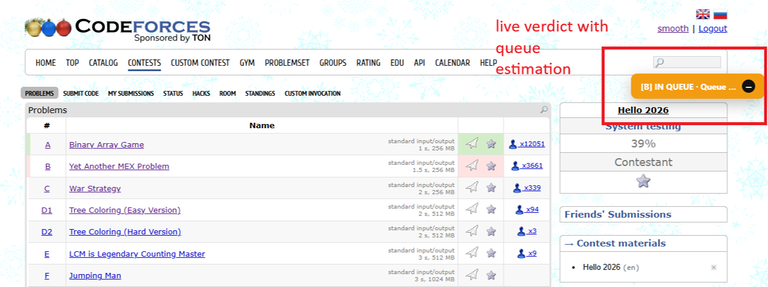
Queue estimation — shows roughly how many submissions are ahead of yours
- Queue info appears only while your submission is being judged
- Verdict refreshes automatically every few seconds
- Draggable badge — place it anywhere on the screen
- Minimize / maximize
- One-click enable/disable ,pause it anytime from the extension popup
- Everything is designed to be minimal, fast, and contest-safe.
How to Add the Extension (Local Install)
- Clone or download the repository Github.
- Open Chrome and go to: chrome://extensions
- Enable Developer mode (top-right corner).
- Click Load unpacked.
- Select the project folder. The extension will now appear in your browser and work automatically on Codeforces contest pages.
Note
There may be a slight delay in verdict updates, as the extension relies on Codeforces’ public API, which can lag by a second or two during heavy contest traffic. This is a limitation of the API itself, not the extension, and helps ensure stable and contest-safe behavior.
Final Words
Special thanks to my friends Anushka126 & Iam_6_Feet & yes, ChatGPT , they helped a lot in debugging and testing some features. If you found this useful, consider upvoting the blog and starring the repository. It really helps the project reach more people. The extension is completely open-source, and contributions are always welcome. If you have ideas, spot improvements, or want to add new features, feel free to open an issue or submit a pull request.


Auto comment: topic has been updated by smooth (previous revision, new revision, compare).
Auto comment: topic has been updated by smooth (previous revision, new revision, compare).