


We can view friend standings and we can view rating history graph for individual. Did you want to view rating history graph with friends? At least, I wanted.
Rating history graph on Codeforces uses flot jQuery plug-in and the plug-in support multiple data sequences. Therefore such functionality can be easily implemented. If many Codeforces users want, the functionality will be integrated by admin, hopefully.
So, I made user.js script (v1.3 2015/05/05) to show usefulness of the functionality. The latest code is also at github. [Updated: v0.02] Y-axis is adjusted when higher rating is shown, and message box appears when data can't be obtained properly. [Updated: v0.03] While you log-in, your rating graph appears in any profile page initially. [Updated: v1.2] Red dots for the highest ratings are kept and autocomplete for account names is added.
Please note that this is an experimental script and I am just a newbie for user.js script. On my environment, the user.js script works with the following browser:
- Firefox 3.6.16 with Greasemonkey 0.9.2
- Opera 11.01
- Chrome 10.0
- Install user.js script. This procedure depends on your environment. Please consult manual for your using software.
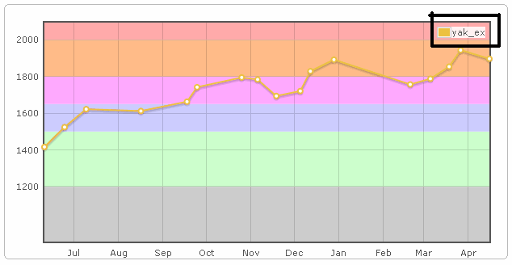
- Go to a profile page. It is not necessary to be yours. [Updated: v0.03] If you logged-in and go to a profile page other than yours, you can see a graph with your rating graph, like shown as 6, without the following procedure. To be precise, an original graph is shown at first and updated after a while.
- Click legend part, then prompt is shown.
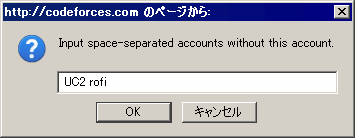
- Enter space-separated accounts you want to view with the account of the profile page, and click OK. [Updated: v1.2] If you type more than or equal to 3 characters, autocomplete is triggered like "Find user" feature.
- Wait seconds.
- Rating graph is updated. Note that the legend moves to bottom-right.
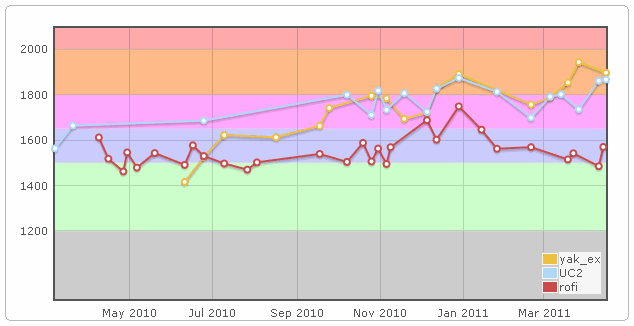
By clicking OK with empty value at prompt, rating graph goes back to original state.
[Updated: v0.03] If you logged-in, your account is entered as default value, except for your profile page. If you want to see an original graph, you need to clear the value and click OK.
Clicking cancel at prompt, rating graph is unchanged.
I hope you enjoy it!


>And can you modify script so that your rating graph appears in profiles?
I'm sorry that I do not understand what you mean, probably. Could you describe what you want in detail?
Maybe I still misunderstood you...
Moreover, I study JavaScript on the programming classes at the university these days and now I have an intention to write my own user scripts: your post lets me know about Greasemonkey.
Hi. It seems that now it doesn't show my graph be default. Maybe it's connected with new feature (sharing) on CF graph. (I'm not sure when it became broken)
Does somebody have this problem too?
Reproduced. Filed as https://github.com/yak1ex/cf_userjs/issues/1 I'll fix it.
Fixed and released as v1.1.
Thanks, it works
Now Codeforces has a feature that shows with red dot the highest rating ever achieved by user. But script doesn't support this and overloads this feature so the dot is still yellow.
Also, «Colorize standings» now doesn't support newly added languages such as JS and Java 8.
Thanks for reports. I updated them.
Is this extension still working in Chrome?
I tried to install just now, but in step 3, when I click on legend, nothing happens :(
I am using Chrome Version 42.0.2311.90 (64-bit) on MacOS 10.9.5
It has not caught up with HTML changes on the Codeforces site. Now fixed in v1.3. Please try again.
So is there any upper bound for the number of accounts one can view?
Apparently until the script crashes, #potential_bug XD
Really nice plugin! For people who want to use this, you'll need to change
http://tohttps://everywhere in the code to make it work.How to use it, I installed but dont know how to use ;-;
Very nice script. Here's how to install it in chrome / chromium: download the script, change all http:// in the script to https://, go to chrome://extensions, drag and drop the script there.
am i the only person who is facing problems with that script after the most recent codeforces rating graph update?
After rating chart update the javascript code of the website was changed․ I have modified the parser code a bit and now the userscript works. I have also added two variables for settings. You can change their values before installation.
You can find the modified userscript here.
Configured with Tampermonkey, thx!
You need to download an old (2019) version from tampermonkey, then replace it in the settings with the new code.