


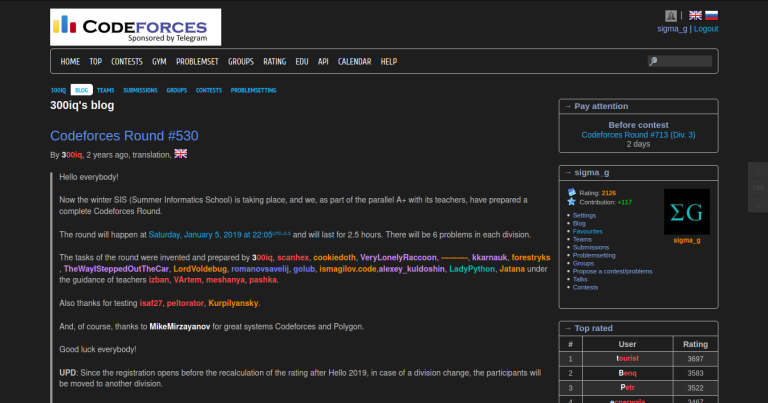
Hi all, I have made a dark theme for Codeforces. Solving problems on Codeforces at night becomes very tough due to the completely white theme. Even in the morning, staring at the white screen for long does not help people who develop eye strain quickly, like I do. Hence, I made this dark theme.
Quick access installation link
I was not content with simply using a color inverter for the website, as there are many subtle elements, especially the rating colors, which would lose their essence when inverted.
It will surely take your eyes some time to adapt to this new format of colors. However, I would really suggest you to use it for at least a day or two.
I have been using this daily for over two months now, so it's safe to assume it's very well battle-tested :) (except the problem setters page though, I am not really sure how that looks) I have added dark theme formatting for the source code viewer and submission editor as well!
Currently it's a userscript. Please find installation instructions on the GitHub repo. If enough people start using this, I might package this into a Chrome extension.
I would really welcome any constructive feedback that you have regarding it :)
Thank you!
Screenshot


Its quite good and impressive. Do you have any suggestion for vscode theme that has similar color theme.
Hi, thanks for your feedback! You might want to look into Monokai, that's the code styling sheet I used for this userscript. (Press Ctrl-K Ctrl-T to open theme menu, and select the Monokai theme in VS Code.)
If enough people start using this, I might package this into a Chrome extension.
Firefox users left the chat
In fact Chrome extensions can be used in Firefox but not vice versa :D (edit: I mean when you use the Firefox API instead of Chrome API, for which Firefox has support too).
Hi, sorry I didn't mention Firefox. In this case though, it's not at all difficult to make an FF port, since I am not using any browser specific APIs until now. So stay tuned :)
great work...
This is lit. Great Work. Thank You
Now I'm writing the comments on a white background ( comment box's background is white ) and please make Codeforces logo dark too :)
Hi, thanks for the feedback. I just pushed an update that should make comment boxes dark too :)
Also, I am a bit hesitant to change the CF logo, since I am not sure if it's even allowed in the first place. In fact, the CODE part of the logo is entirely black so that would require changing the colors entirely.
Maybe you could put an ellipse around it so that it still is visible, and make the ellipse a darker color, like maybe dark green?
I can't think of a better insult to this project.
For me the script doesn't work. I use Windows 10, test with the latest version of browsers Chrome, Firefox, Opera, Edge & with 4.8 version of Tampermonkey (latest too). Only facebook "likes" area in upper right corner became black, all other remained white. Could you help to fix it?
Sale bherwe Teri maa chod dunga, Abe namard agar gaand me dem h to reply kar . Bhosdi wale Tere pichwade me goli Mar dunga.
[Deleted]
I mean Dark Reader basically does the same thing.
I'm been using this for so long that I completely forgot codeforces was white
good work . Thanks.
Codeforces should have a default dark theme.
if you want to change the logo to dark mode:
Install style as userscript
You told me you are doing this months ago! At least you made your promise :)
=))
This is really amazing dude!! Thanks,i needed this :) Perfect Job!
I need to change the font color and size(problem page),could you please point me which line to edit
I'm not sure if I understood correctly, but mostly you can get the desired result by (1) inspecting the actual webpage to see which element selector (id, class) corresponds to the element you want to change (2) going to the userscript and finding that corresponding selector being used (3) adjusting the property values accordingly. If you cannot find these values then let me know via direct message.
sigma_g Kudos to your efforts. It's a great tool and enriches the experience of using codeforces.
In "status" page my submissions are not highlighted which used to be without the dark theme. If you could fix this it would be nicer. PS — Great job
Hi, thanks for reporting the bug, I have created a new issue for this. Please see here. I will fix it and push out an update soon.
Thanks for this! Appreciate all the work you've put into it.
Okay one question. I tried to install tapermonkey in the process and I shows me that it can read and "change" all the data on websites I visit. Does not it compromises my security just for a black theme ?
TamperMonkey just basically acts as you to run scripts: but it's a lot more powerful than chrome's built in console.
Because it needs to edit the webpage, it needs your permission. Of course, if you somehow download a virusy userscript, then of course, tampermonkey then becomes a much larger liability.
Pasting some suspicious script to TamperMonkey and telling it to run it (which I believe you will never do) is one issue, but the other is: what if TamperMonkey itself gets compromised to run some script you didn't tell it to do. You can (at least in Chrome) limit permission of any extension to particular domains. Just click in top right corner: extensions and when list of all extensions you have pops up click "more actions", go to "This can read and change site data" and limit its permission e.g. only to codeforces.
And speaking of security of this script. sigma_g why does the script has following two lines:
// @match https://calendar.google.com/calendar/embed* // @match https://www.facebook.com/v2.8/plugins/like.php*
which, unless anyone installing it spots it and removes them, mean: TamperMonkey will run the script on on those domains as well. Moreover after I removed them, the dark theme on codeforces.com still works fine.
Hi, the first match URL is for the embedded Google calendar on the Codeforces Calendar page (hence the
/embed) and the second is for the Facebook Like plugin that is present on the home page of Codeforces (for logged in users) (hence the/plugins/like.php).I'd like to clarify that these match directives won't let the userscript run on the entire domain, but only on the very specific path that has been mentioned. You can of course remove those two match directives and the extension will still work fine for the remaining pages. I wanted to support all the different components on Codeforces, hence I had added them in.
If you're still unsure, you can check out the entire code on GitHub, in particular, the small JavaScript file with its very clear and descriptive code, to ensure it does nothing suspicious. If you're worried that my account may start pushing evil scripts in the future, you can also disable automatic updates for the userscript (enabled by default) from inside Tampermonkey.
I completely agree with your concern for security, and I hope the above has helped clear any confusion there might have been. I try to be as transparent as possible in these regards, and would welcome additional comments/questions. Thanks!
There is one feature, that doesn't work at all with your plugin. It is highlighting last submission you've viewed in hacking mode red and all other you've viewed green. I added following code at the end of your script and it fixed it.
Sadly it's quite an ugly solution given it fetches all submission elements every second, but I couldn't come up with anything better, especially as it can be tested only during div1/div2 round.
You can probably make it a lot less expensive by replacing
documentwith the lowest common DOM container of all the[acceptedsubmissionid]nodes (solcdc.querySelectorAllinstead ofdocument.querySelectorAll).I'll not merge this into the main repo since, as you said, it's a per second computation, and it doesn't seem to be super relevant to most people. And anyone who wants to add it can add from your comment.
In any case, thanks again!
Its awesome thanks a lot
Just to prevent another monkey from making the same mistake as myself, the steps in which you download everything matters. I originally downloaded the code, then the script, and then pasted the code into Tampermonkey. Took me half an hour to realize I should have let Tampermonkey do its thing ):
This is not working, is it changed ? I installed tapermonkey, added script to it. But not changing the color to black, something else i am forgetting here ?
I is changing color but not the way expected, so is the script wrong or some setting needs to be changed ?
Why do people like dark theme rather than light theme ?
In my situation I have phone with black edges and OLED screen
wow thanks that helped so much
Great work! I really like the theme. However the little icons for things like country flags, the paper-airplane and "favourite problem" buttons in problemset, etc. have a square white background which I find eerie. Is it just for me? If not, it would be great if you could fix it!
This is a recent issue (<1 month). Actually, earlier I thought the issue is because of some change from Codeforces server side, because this issue had started occurring without me pushing updates to the userscript.
But, now, I noticed there was some minor CSS issue in my userscript. I don't know how it was working earlier.
I have fixed it and pushed the update. You should get the auto-update within 2 days, or you can manually reinstall the userscript from the same GitHub page. Cheers!
Hey ,it is not working on brave browser . Any one any idea about it .Also did u made an extention of this theme ?? Please help this white thing is having too much stress .
Please make this into a chrome extension
why don't you just create an extension it will be easy to install....
CodeForces multiple test cases color is updated, please update input test cases color
Check this comment
Hey! Very sorry but I am not actively using CF anymore. I was notified of this issue on GitHub by two helpful community members last week (https://github.com/GaurangTandon/codeforces-darktheme/issues/46) and I have since then immediately patched the issue. Please re-install the theme if you didn't get the updated version yet.
Thanks to all of you for using my dark theme for so long, and hopefully this fix will help you to continue using it for longer! :-)
If you ever face any issue, please notify me on my GitHub repository, and I will do my best to fix it asap.
Cheers!
wow the script still works!
Is it just me or the script has suddenly stopped working on Chrome
It was running fine till yesterday and other scripts through tampermonkey seem to work fine but this one stopped suddenly?
I think it has stopped after the auto-update of tampermonkey.. maybe the author would do smth about it.. hopfully
UPDATE 1: it worked just fine after rollingback from tampermonkey 5.3.1 to 5.3.0, I don't exactly know why but I will come back after reading the change log of the new versoin (5.3.1) of tampermonkey
UPDATE 2: I think that it is either a problem with the importation process of the 3 resources cited at the beginning of the userscript code, or the current implementation of those resources on the new environment of Tampermonkey. Either way, I replaced them with the following resources from the "Codeforces Dark Mode" user script -different than the dark THEME's- and it worked just fine! the new resources: // @resource desertCSS https://github.com/LordLava/codeforces-darktheme/raw/master/desert.css // @resource monokaiEditorTheme https://raw.githubusercontent.com/ajaxorg/ace/master/lib/ace/theme/monokai.css // @resource darkthemecss https://github.com/LordLava/codeforces-darktheme/raw/master/darktheme.css
NOTE: each "//" represents the beginning of a new line, nd for clarity: the above three lines were replaced with the lines 10, 11, and 12.
UPDATE 3: Another workaround that worked for me is to just switch to the beta version of tamper monkey without doing anything else. In other words, just remove the tampermonkey extension, install the beta version of it, then install the codeforces dark theme userscript and it should work just fine! Apologies for taking much of your time.
This feature is currently disabled, Is there an alternative?
Not Working
Codeforces Lite — Dark Mode & Code Runner
this extension on chrome is working for now
this helps my eyes A LOT bro thx
Bro ure a lifesaver thanks <3