


CodeMentor: Your AI-Powered Companion for Competitive Programming
Hi Codeforces!
I'm excited to share CodeMentor — a Chrome extension I built that gives you progressive AI hints and explanations when you're stuck on problems, without spoiling the solution. It's designed to help you learn and grow, whether you're practicing for contests or preparing for interviews.
What It Does
For Codeforces & CodeChef (Competitive Programming): Get progressive hints to improve your CP skills without spoiling solutions. Perfect for when you're stuck during practice or want to understand a problem better after a contest.
For LeetCode (Interview Preparation): Get detailed explanations and hints to understand problems better for technical interviews. Learn problem-solving patterns and approaches that interviewers look for.
Features That Will Help You
Progressive AI Hints & Explanations
The Problem: You're stuck on a problem. You've been staring at it for hours. You don't want to see the full solution, but you need a nudge in the right direction.
How CodeMentor Helps:
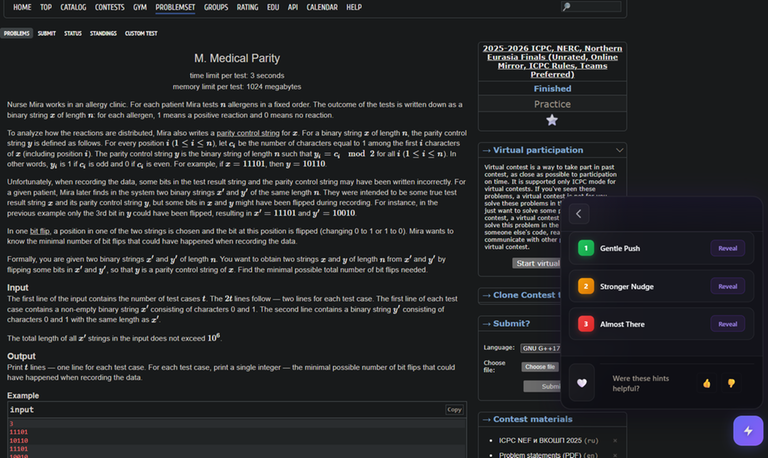
The extension provides three levels of progressive hints that guide you without giving away the answer:
- Gentle Push — Points out a key observation or reminds you of a relevant concept
- Stronger Nudge — Suggests an approach or data structure that might be useful
- Almost There — Gets you very close, but you still need to connect the dots yourself
Plus, you get detailed explanations that help you understand the problem concepts, approaches, and why certain techniques work. The AI automatically analyzes the problem statement and generates contextual hints tailored to what you're working on.
Why This Matters: You're still doing the thinking, still learning, but you're not stuck in frustration for hours. It keeps your motivation alive while ensuring you actually understand the solution when you get there.
Supported AI Providers: OpenAI (GPT-4o-mini), Google Gemini, Claude, Groq, and more. You choose what works best for you.
Contest Tracking
The Problem: You miss contests because you forget about them or don't know when they're happening.
How CodeMentor Helps:
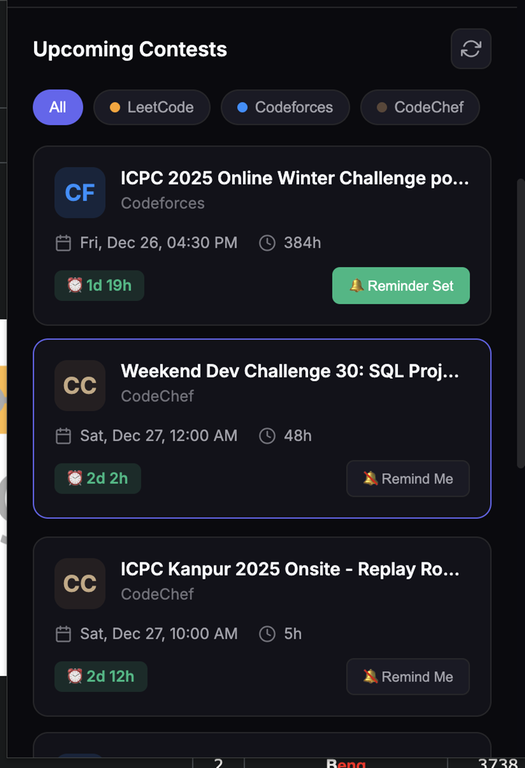
- Multi-platform tracking — Automatically tracks upcoming contests from LeetCode, Codeforces, and CodeChef in one place
- Timezone-aware — All contest timings are displayed in your local timezone automatically
- Smart notifications — Get notified before contests start (configurable: 15 min, 30 min, 1 hour, 2 hours, or 1 day before)
- Filter & search — Filter contests by platform and search by name
- Auto-refresh — Contest list updates automatically every 6 hours
- Countdown timers — See exactly when each contest starts in your local time
Why This Matters: Never miss a contest again. Stay organized and prepared. Focus on practicing instead of manually checking multiple websites. No more timezone confusion — all times are automatically converted to your local timezone.
Unified Streak System
The Problem: You practice on multiple platforms, but tracking your consistency across all of them is a hassle.
How CodeMentor Helps:
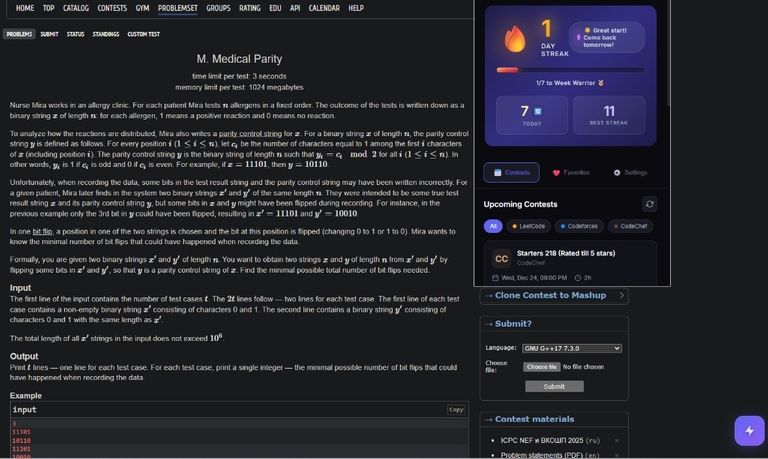
- Unified streak — Combines your activity from LeetCode, Codeforces, and CodeChef into one streak
- Automatic sync — Syncs with platform APIs to track your submissions automatically
- Background updates — Streak data updates automatically every 15 minutes in the background
- Daily counter — See how many problems you've solved today across all platforms
- Motivational messages — Get encouraging messages for streak milestones (7, 30, 50, 100, 365 days)
- Visual progress — Progress bars showing your progress toward the next milestone
- Best streak tracking — See your longest streak to stay motivated
How Streak Updates Work: The extension automatically syncs your activity from platform APIs every 15 minutes in the background. If you want an immediate update of your entire streak, simply click "Save Settings" in the Settings tab — this will trigger a full refresh of all your streak data right away.
Why This Matters: Consistency is key in competitive programming. Seeing your unified streak across all platforms keeps you motivated and helps you build the habit of solving problems daily.
Problem Timer
The Problem: You spend too long on one problem without realizing it, or you want to track how long you spend on each problem.
How CodeMentor Helps:
- Automatic tracking — Timer starts automatically when you open a problem
- 30-minute reminder — Get notified if you've been stuck for 30 minutes
- Visual display — See elapsed time in the hints panel
- Smart suggestions — Get hints or solution links when timer hits 30 minutes
Why This Matters: Time management is crucial in contests. The timer helps you practice efficiently and recognize when you might need a hint instead of spending hours stuck.
Favorites System
The Problem: You find interesting problems but forget to come back to them later.
How CodeMentor Helps: 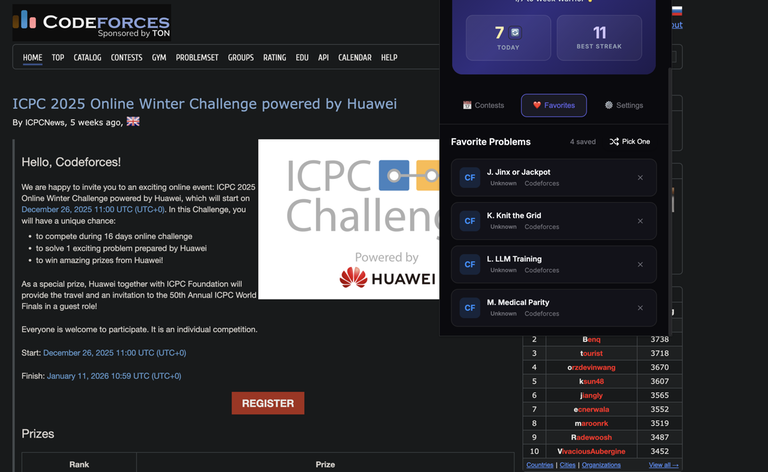 - Save problems — Mark problems as favorites across all platforms with one click - Quick access — View all favorites in the extension popup - One-click open — Click any favorite to open it in a new tab instantly - Pick One — Randomly select a favorite problem when you don't know what to practice
Why This Matters: Build your own curated list of problems to revisit. Great for problems you want to solve again, problems you found interesting, or problems you want to review before contests.
Privacy & Security
Your data stays yours:
- All data stored locally — Everything is stored in your browser, not on any external servers
- API keys encrypted — Your API keys are encrypted and stored securely
- Direct communication — Your API key goes directly to your chosen AI provider (OpenAI/Gemini/etc.), not through any intermediate servers
- No tracking — We don't collect any personal data or track your usage
- Open source — The code is available on GitHub for transparency
Why This Matters: Your privacy matters. You control your data, and we don't have access to it.
How to Get Started
Installation
From Chrome Web Store (Recommended): Install CodeMentor
From GitHub (for development):
- Clone:
git clone https://github.com/BitMastermind/CodeMentor.git - Open Chrome and go to
chrome://extensions/ - Enable "Developer mode" (toggle in top-right)
- Click "Load unpacked" and select the
CodeMentordirectory
Configuration
- Click the extension icon
- Go to Settings tab
- Choose your AI provider (OpenAI, Gemini, Claude, etc.)
- Enter your API key
- Enter your platform usernames for streak tracking
- Click Save Settings — This will immediately update your entire streak data from all platforms
Note: Your streak updates automatically every 15 minutes in the background. Clicking "Save Settings" gives you an instant refresh if you want to see your latest stats right away.
Using Hints
- Navigate to any problem on LeetCode, Codeforces, or CodeChef
- Click the lightning bolt floating action button in the bottom-right corner
- Wait for AI to analyze the problem and generate hints
- Click "Reveal" on each hint level to see progressive guidance
- Read the explanations to understand the problem better
That's it! You're ready to go.
The Philosophy Behind Progressive Hints
I was inspired by two amazing Codeforces blog posts that shaped how I designed the hint system:
- How to read problem statements — This taught me the importance of understanding problems deeply before jumping to solutions
- How to practice competitive programming — This showed me the value of progressive learning and getting hints at the right time
The hint system follows a learning-first approach: start gentle, build gradually, and let you connect the final dots. This way, you're still doing the thinking, still learning, but you're not stuck in frustration for hours.
I Need Your Feedback
I've been using this extension myself for a while, but I'd love to hear from the Codeforces community:
- Try it out and let me know what you think
- Share your experience — Do the hints help? Are they at the right level? Too easy? Too hard?
- Suggest features — What else would make your competitive programming journey easier?
- Report bugs — If something doesn't work, please let me know!
I'm particularly interested in:
- Are the hints at the right level?
- What other features would be useful?
- Should I add support for other platforms (AtCoder, HackerRank, etc.)?
- Any suggestions for improving the UI/UX?
Links
- GitHub Repository: https://github.com/BitMastermind/CodeMentor
- Chrome Web Store: Install CodeMentor
- Issues & Feedback: GitHub Issues
Why I Built This
When I started competitive programming in college, I was passionate about it. I loved solving problems, that "Accepted" feeling, learning new things every day. But I had a problem: I had no one to help me when I got stuck.
I wanted to solve problems on my own — that's the whole point, right? But sometimes, after hours of staring at a problem, I just needed a small hint. Someone to explain it differently. Someone to keep me going.
I didn't have that. No mentors, no study groups, nobody. The frustration of being stuck without help eventually made me quit competitive programming. It's one of my biggest regrets.
So I built CodeMentor — the extension I wish I had back then. If it helps even one person avoid quitting CP like I did, it's worth it.
Competitive programming is hard. It's supposed to be. But it shouldn't be so hard that you give up. Sometimes you just need a small hint, a different perspective, or just someone to explain the problem in a way that clicks.
That's what CodeMentor aims to be — your AI mentor, available 24/7, ready to give you that nudge when you need it, without spoiling the journey.
TL;DR: Chrome extension with progressive AI hints and explanations for CP (Codeforces/CodeChef) and interview prep (LeetCode). Features: hints, contest tracking, unified streaks, problem timer, favorites. All data stays local. Would love your feedback!


