


Hey Codeforces,
During contests, I kept losing time on things that had nothing to do with solving the problem — manually copying samples into an online compiler, re-running after every edit, squinting at wrong answer output trying to spot the difference. It's friction that adds up, especially under time pressure.
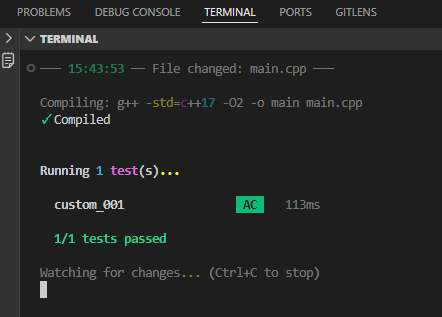
So I built kJudge, a CLI tool for local testing of CF solutions. The core idea: fetch samples automatically, watch your file for changes, and show you a clean diff when your output doesn't match. No browser tab switching, no manual input pasting.
What it does:
- Auto-fetches samples from Codeforces for any problem — just point it at the problem URL
- Watch mode — re-runs your solution on every file save, so the feedback loop is as tight as possible
- WA diffs — expected vs actual output shown side by side, not just "wrong answer on test 2"
- Contest scaffolding — one command sets up folders and templates for every problem in a round
- Works with C++, Python, and Java; pure CLI so it's IDE and OS agnostic
Setup is a single binary download from Releases — run it once and it adds itself to PATH. Full guide in the docs.
Repo: https://github.com/Byte-ne/kJudge Docs: https://byte-ne.github.io/kJudge
This is my first public tool — built it for my own practice sessions and figured it might be useful for others in the same boat. If something's broken or you want a feature, open an issue or drop a comment.


