AvDev's blog

By AvDev, history, 11 months ago, In English

Hey everyone! Last week, I launched Codeforces Custom Contests, a Chrome extension (now on Firefox too) to instantly create personalized contests. I just wanted to thank you all for your support as there are over 300 new users in just one week!

Summary for New Users: Create custom contests instantly and analyze your results to efficiently train and improve your rating! See more info in the previous post

I’ve incorporated feedback and suggestions on the previous post and shipped a major update. Here’s the details!

What's New

  • Advanced Post-Contest Analytics: Track your progress and find your weaknesses with detailed performance metrics. See accuracy by tag/rating, a contest history, an upsolve list, and more!
  • Problem Tags Filtering: Target specific tags to improve faster
  • Firefox Support: Now available on both major browsers! Download here

New UI Preview
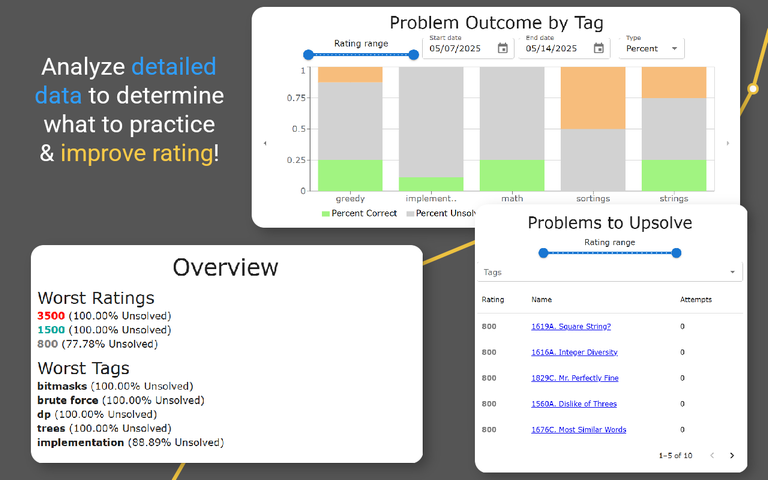
Add the extension to Chrome or Firefox now to see your rating climb faster!

Share your feedback below to shape future updates!

Full text and comments »

  • Vote: I like it
  • +3
  • Vote: I do not like it

By AvDev, history, 11 months ago, In English

UPD: Thank you all for 300+ downloads in just a week! I've shipped an update with new features like analytics. Details are in this post!

TLDR: Create custom contests instantly to efficiently train! Download on the Chrome Web Store

Train Specific Skills & Improve Rating

Frustrated when problems in virtual contests jump from doable to impossible? Want to train speed or problem solving specifically? The CF Custom Contests extension makes this effortless!

Key Features

This extension elevates your training experience by providing the following features

  • Contest Settings: Choose problem count & ratings and contest length. Short contest + easier problems for speed drills OR longer contest + harder problems for problem solving practice
  • Contest: Solve customized problems in the familiar CF contest format. One-click rerolls if you get stuck
  • Contest Results: Analyze your performance with detailed results. Problem solve times tracked in real-time

Preview the UI

How To Get Started

  1. Add to Chrome or Add to Firefox
  2. Navigate to the new “Custom Contest” tab next to the “Contests” tab
  3. Tailor the settings to your needs and start solving!

Practice smarter with CF Custom Contests and hit your next rating milestone! Get started now!

Have any suggestions or thoughts? Drop it below and I’ll respond :)

Full text and comments »

  • Vote: I like it
  • +73
  • Vote: I do not like it