


UPDATE (5 Dec 2024)
There have been a few new features since its initial release.
- Multiple graphs/testcases (each "tab" can store its own testcase so you can visualize all testcases at once)
- Multi-edge support
- Bipartite mode
- More appearance-related configuration sliders
Thanks for all the support and suggestions! Things will continue to be added slowly over time, but if there's a particular feature that you want you can just open an issue on GitHub.
Hello, Codeforces!
I've been working on a graph visualization tool for a while now, and because I couldn't think of a good name for it, I've opted to call it Another Graph Editor. If you have any name suggestions, pls let me know. Here's the website and the repo.
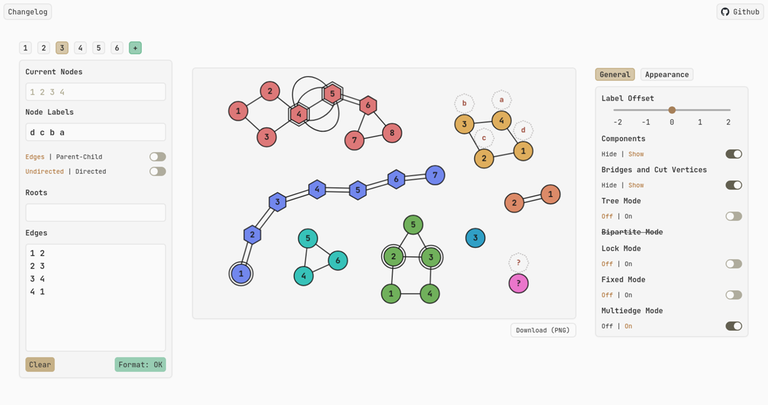
The layout is very much inspired by CS Academy's graph editor. Input is pretty straightforward too, as you may just copy paste the test case edge data into the text area using the form u v w, where w is an optional edge label. You do not need to enter n m, representing the number of nodes and vertices respectively.
Node labels are supported too! Suppose the problem offers an array a where a[i] represents the value at node i, you can just copy-paste it into Node Labels and it'll show up as little octagons hovering over the node. If you want to skip over a particular node (aka an empty label), use the character '_' as a placeholder.
In addition, to handle problems where you are given an array p where p[i] represents the parent of node i, you can click on Parent-Child, and you will be presented with a more convenient interface:
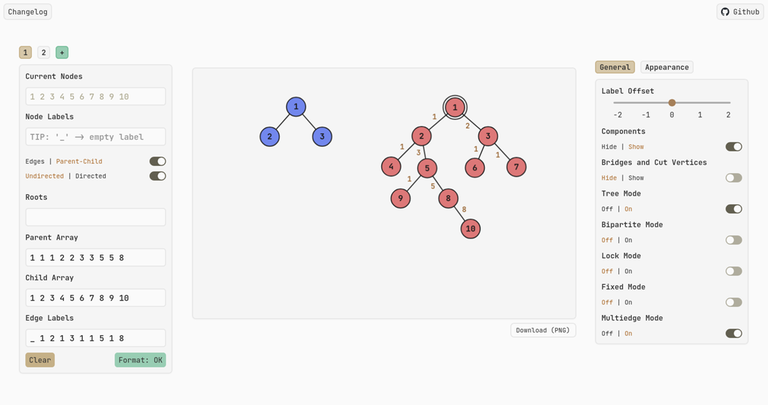
On the right, you may toggle Tree Mode, which rearranges the graph into a tree as you'd expect. If your graph isn't a tree, that's okay too! You'll be greeted with a DFS tree instead, best explained in this awesome blog.
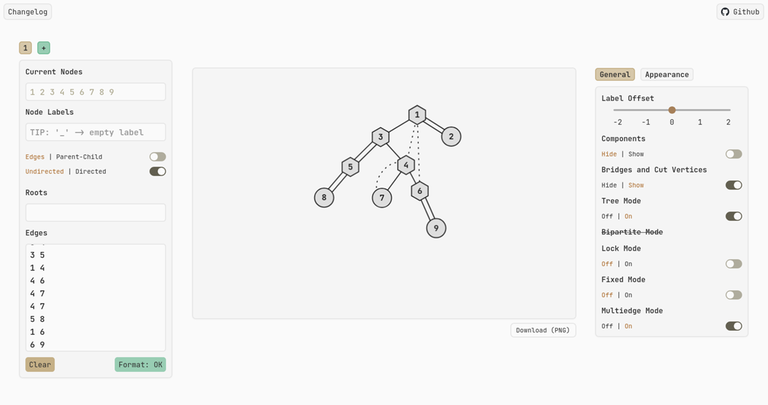
By default, the first node that appears in the input data is the root. If you require some other node u as the root, a tip is to put it on the first line as either u or u u, or if you're in Parent-Child mode, you can prepend u to the front of the parent and child arrays.
Some other niceties include a dark mode, mobile support, the ability to show components (or strongly-connected components for directed graphs), as well as bridges and cut vertices.
Finally, use the Label Offset slider on the right panel to convert a zero-indexed input into one-indexed and vice versa. For example, if the input is one-indexed, use an offset of -1 to make it zero-indexed. Nodes with English characters or emojis as input would not be affected by the offset.
Welp, that's about it. Hope you enjoy using it! If you find any bugs or have any feature requests, do let me know. When I learn more advanced stuff like network flow, I might integrate it into the editor for convenient visualization.


really nice and clean UI, and easy to use. Great website!
Whoa! This looks amazing! Thanks a lot. :D
Thanks!
brilliant, it's 100% better than csacademy's graph editor!
How did you calculated 100%? Why not more, why not less?
proof by AC
I beg to differ. I think csacademy's draw and erase modes are so useful. I always find myself using them
Wow! Nice!
We finally have a strong contender to csacademy. Good job man, this is incredible.
I quite like this too: https://cp-tool-app.vercel.app/graph-editor
there is only 1 problem, these node movements are so smooth that I will forget about the contest and play with them
Great Tool! It's much more convenient and powerful than the old Graph Editor!
Could you improve it so that it can export the picture like the old one?
Hii, thanks for the suggestion, it has been implemented, you can now download your graph as a png image!
Seems like another bookmark tool. Thanks!
I actually like this one, one of the bests in my experience, and also handling dfs tree and bridges/cuts are of outstanding help. Thanks bro,
Better than cscademy
so cool!
u сan use use graphs.algocode.ru btw
beautiful tool with beautiful UI.
It would be great if u could make it to accept graph in other formats too like leetcode where input is given like this
[[2,4],[1,3],[2,1],[4,3]]
or [[2,4,1],[1,3,1],[2,1,1],[4,3,1]].
Yup sure thing, it has just been added; under the default Edges input mode, copy-paste your input string as it is (without adding any spaces/newlines inside the string).
Wowww, thanks for ur work.
Now i dont have to remove commas and brackets manually :D
PS: Upvoted and Bookmarked
Great website. Can you shortly explain how have you build it? I want to learn.
Hey man, glad u liked the website, it's actually my first foray into this web dev stuff, so I got stuck frequently while trying to build it.
The other guy is spot on about the main ideas underlying the project, although there are indeed some tough implementation points here and there to ensure everything is in-sync with one another.
Actually, my motivation to build this came from binge watching creative coding videos on YouTube using HTML Canvas. I would recommend the ones by Chris Courses on YT, they're beginner friendly, and you'll learn JavaScript along the way. After that, I suggest switching over to TypeScript, as it makes debugging way easier. From there, pick up React using a few YT tutorials, and as for styling, I find Tailwind CSS the most convenient. You do not need to memorize all the different styles, simply open the docs in another window and search for the thing you're unsure about.
Finally, a lot of these technologies may seem pretty overwhelming at first, but don't stress over learning every aspect of HTML/CSS/Typescript/React; once you have a decent grasp of the general ideas, I feel that you can just start building your website. If you get stuck, just search things up and learn along the way.
It's a great website! But can you make the tips on how to make a certain vertix to be the root of the tree more clear? For example, may you add a Root Input Box after the "tree mode" or add a tips on how to fix the root? XD It may be a little bit hard to discover that ". If you require some other node u as the root, a tip is to put it on the first line as either u or u u"
Hii, I've added a root input box in the left panel! This should make it more convenient to adjust the root to your liking.
Feature request: add the ability to generate a random graph/tree
Thanks for the suggestion, I'll add it to my todo list. Currently, I'm still trying to figure out a nice layout for the next major update, where there'll be an algorithms panel for things like shortest path, cycle detection, subtree sizes, centroid decomposition, etc. Your random graph generation idea would likely fall under this algorithms panel as well, so do look forward to it in due time.
Thats soooooo cool! However, I think it's a good idea to provide more "custom" settings to user instead of making lots of built-in algorithms. Beacause there are sooo many different kinds of algorithm, also a same algo may leads to different graph depends on different implementation (i.e. The root is 1/n? How to sort edges? How to handle self-loop?)
Aaah I see, I get your point. I guess I'll focus the development in that direction instead. If you don't mind, I could also send you previews of upcoming features every now and then when I have made more progress, because I'm not familiar with UI/UX stuff and it'll be good to get more opinions on whether it's user-friendly or not. Note that development might be a little slower cos school just started for me, but I'll work on it during my free time.
Name: Beautiful Graph Editor
Really nice and useful website for programmers.
There is a bug in code, when "directed" option is on, and "parent-child" option is clicked, there is a error which causes website to crash.
Hi, it has just been fixed!
LOVE IT! Keep up the good work.
Another feature request:
It would be great if you could add a feature that centers the graph to the middle of the editor for downloading. I'd love to use these visuals for some of my personal notes!
Hi, actually the original physics implementation attempted to push everything to the center, but I felt that users who work with multiple graphs would want to drag the less important ones to the side, whilst keeping the main graph in the center. For now, a workaround is to drag your graph to the center manually before exporting to PNG. If I figure out a nicer workaround, I'd let you know.
A bug: These toggles clear all edge information. It still displays the correct image tho.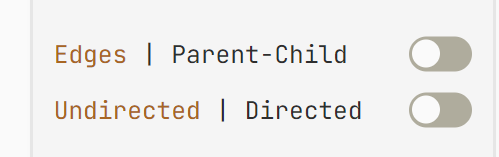
Fixed! Edge information is now preserved across toggles. Thanks for finding the bug.
Can we make all solid lines disjoint, under the tree mod?
Not at the moment unfortunately, because in tree mode, solid lines represent span edges, while disjoint lines represent back edges. In a future update, I'll add more configuration options so you can make all lines disjoint. There will be more line styles for you to choose from too!
wow greater tool , can you add a feature for coloring nodes ?
Hi, I'm a little unsure about a node coloring feature rn because components/SCCs are in charge of the node fill colors and if I were to let users color nodes as they wish, it might look pretty messy.
But I do understand where you're coming from, and I'm thinking about making a simple drawing tool, which you can use to annotate your graph, jot down ideas at the side, etc. I'm also considering something like adding glow to nodes that you've double-clicked on, thus highlighting that you've marked these nodes.
How abt adding a bi-coloring feature, and then grouping the vertex in 2 disjoint sets(like a bipartite graph). and if the graph wasn't bipartite, just bi color it and mark the bad vertexes with another color
yup, bipartite coloring will be added in the next update!
I think components dictating colors is less useful than being able to change colors separately for each node. You can still have both, by having a field "node colors" similar to "node labels" and only displaying those if the components are hidden.
The tool is really great though and I really appreciate you making this and sharing it with the community.
Yup I agree with u too; in the future there might be a color palette for you to select the fill color, and when u click the node it will color it accordingly.
It is very cool!
Great website!
Label offset is a super useful feature!
An advice : Record the position of the points when the graph doesn't make any change. When you turn on the lock mode and switch between the "Edges" mode and the "Parent-Child" mode, the points will be everywhere. That's really bad.
By the way, it's a really good website! I have already suggested it to my friends.
When you switch, It will display like this:
Fixed! You might have to use Ctrl+Shift+R if you don't see the change right away. Thanks for finding this weird behavior!
Hey! Could there be a certain way to mark a node?
Not at the moment sry, it'll be available on a later date.
Nice work. It's an easy-to-use and very powerful tool to me.
Here are some suggestions:
Make some tools to edit the tag of each node, instead of editing the full sequence, so we don't need to type a long sequence of
_'s to add one tag.Visualization of self-loops and multi-edges. This is rare to see in problems, but it will help a lot in debugging of some problems which needs the program to build a graph itself.
Thanks for the suggestions! (1) will definitely be revised because I also find it quite tedious to have to type
_all the time. For (2), I have some idea on how to use bezier curves to draw non-overlapping self-loops and multi-edges, but i might have to temporarily disable algorithms during these situations because I think most algorithms don't work when you have self-loops/multi-edges (at least with my very limited algorithm knowledge).Multi-edges are available now.
But how to make a curved self-loop ? Is there any special command for that ?
An advice about UI : Please make the input blank bigger! If you input too many numbers in the input blank like "Current Nodes" or "Node Labels", there will be a slide bar in the bottom of it. And it really makes me difficult to see the values clearly.
Like this:
Ah, thanks for pointing that out; scrollbars have just been removed for all input boxes except Current Nodes (because it's readonly and you might need to scroll left and right if you have many nodes). Hopefully it makes things better.
May I know what browser/device you're on? On Firefox the scrollbar disappears when I click away, but if your browser doesn't do that and you work with a lot of nodes or you can't see the values in Current Nodes clearly, do let me know. I'll try to increase the y-padding or make the font-size a little smaller.
I'm using Google Chrome. The problem in "Current Nodes" is even worse. It not only has a scroll bar in the x-axis, but also one in the y-axis.
By the way, a better way is using selector like
#graphInputParent::-webkit-scrollbarand setdisplay:noneinstead of usingoverflow:hidden. That will allow user to move cursor by selecting content. It's more convenient and can solve this problem.Also, it will display like this:
Thanks for providing the fix! The code has been updated accordingly.
Hope your website will be better and better. =)
Shouldn't there also be a way to toggle the length of the edges, like in csacademy editor?
Thanks, it has been added!
It's a great project. Thanks! Will use it.
I have a suggestion for improving the app, maybe we could plan on a feature of an infinite grid for really large graphs to be displayed properly and you can zoom in, and zoom out. Maybe also a popular algorithms visualizer (DFS, BFS, Dijkstra, BF...) on your particular graph, it could be pretty fun and challenging features to work in!
Hmmm, that'll be challenging because it'll require the physics to be reworked pretty extensively. I'm also hesitant to add things like simple DFS and BFS because most ppl know how they work, and problems usually require modified versions of these algorithms anyway. But ur infinite grid idea is certainly cool though! I just don't think it'll come in the near future.
Hey, bro. I have already found a bug (maybe is feature) recently. When you input
1 2in the Edges blank and add some numbers after2like2231313, it will create a new node after you type it. Since the position of the new nodes is random, the position of these points will change greatly.Can you fix this bug? thank you.
Fixed!
The problem seems to have not been resolved yet. When you turn on the tree mode, the same thing will happen like before.
Try just modify the labels of the node instead of creating new nodes when the number of the nodes doesn't change.
After some searching, I realized that in that tiny fraction of a second, the affected node would be deleted and a new one would be added, causing the unexpected teleportation. Because the label of a node is tied to its ID, there's no way to not destroy and then create a new node.
Fortunately, I figured out a hacky solution: store the position of the last deleted node (if it exists), and when a new node is created, spawn it at that location. The effect is a lot smoother now. Let me know if it works for u too, or if there's other issues to fix. Thanks!
Other than this small bug, I really love the UI of the editor.
It seems like there is an error in rendering the physics of the nodes. After a node is exactly on top of another node of the same edge, it can't be separated anymore, unless you delete the node and re-add the edge with the deleted node once again. You could try by add edge 1-2, put 2 on top of 1, and then try to move one of them. CSAcademy's implementation won't fail this case, since nodes always repel one another.
Thanks for finding this weird bug; I realized it's because the old implementation lets you select more than 1 node at a time, I've changed it so you can select at most one node now. If you still encounter this issue do let me know.
idk if this bug has already been reported or no but i found one. i was just playing around with the editor when one node got pushed perfectly into the corner and when i put another node perfectly over it all the node disappeared and the one node i dragged got disappeared after i released the click.check out test vid (don't worry it's not a rick roll) also as seen in vid after refreshing it works fine but without refreshing tool breaks completely.nyavim
Wow, that's a rare find! After some digging, I found out that this only happens when you manage to squish two nodes perfectly together such that their distance becomes zero; and because part of the physics computations divides by this distance, everything becomes undefined. It has just been patched (I've set a minimum internal distance now, although visually you can still squish one node on top of the other). Thanks for the clear reproduction steps
Glad to be of help also great tool
IDK if you are still working on this project or not but one thing i wanted to point out. It would be great is this tool work for bidirectional graphs as well. For now if I input:
1 2 4 \newline 2 1 5
4 and 5 kinda merges together to show a weird number.
If you can fix this it would be great.
Yup it has been fixed for the bidirectional case. Thanks!
Another suggestion: please add the ability to fix nodes to a position, like you can do in csacademy. This is really helpful when it comes to more complex graphs.
Alright, I'll add it to my todo list
great =)
You are a real one for adding label offset!
Hi I really like your UI can you add a function to colour nodes please)
Cool stuff mate, one of the best things I have seen in a while
Possibly Little bug ? If a weighted graph contains more than 1 edge between any two nodes (u,v), it only shows the last input edge from all the edges connecting u,v
Input
Graph :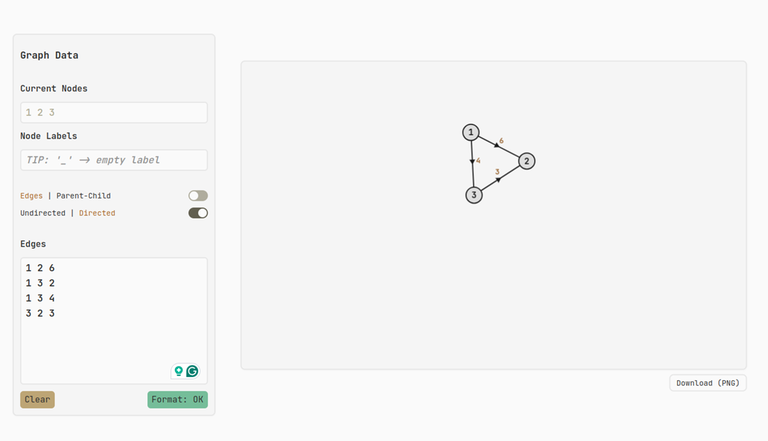
Sry but multiedge support isn't available right now, so internally if you enter multiple edges from u to v, only the latest one is stored. It's an open issue here. If you're working on some multiedge graph problem, you could try this for now. Thanks!
thank you for maintaining this tool!
Auto comment: topic has been updated by nyavim (previous revision, new revision, compare).
Can you add a way to arrange the graph as a tree, but without the need to turn on physics? It's super annoying not to have this feature + it crashes with big graphs because of this
Sure, I could look into it, but it might take a bit of time because currently, tree mode is implemented using imaginary "forces" at each depth of the tree that hold everything. Just to check, what kind of graphs are you working with (e.g., how many nodes/edges)? The tool was designed with small/medium-sized samples in mind... Also when it crashes, what's the console log like? That way I can verify it's not a floating point error somewhere.
Eeemm, 900 nodes? And instead of crashes, I should say "freezes"
Also very interesting way of implementing tree arrangment
Omg that's a lot of nodes... It seems velocity computation is the most time consuming part because currently it runs in $$$\mathcal{O}(n^2)$$$ (every node exerts a force on every other node). Enabling Lock Mode would skip this step and disable physics completely so it doesn't freeze, but the drawback is that you can't display the tree since it relies on the physics to begin with...
There are probably other things that need to be reworked (e.g., support even smaller node radius/font size) to cater to such graphs. One solution I can think of is to adjust the physics such that a node only affects nodes in close proximity (via some kind of collision grid) so way less computations are required and visually it shouldn't have much of an impact.
If you don't mind you can open an issue and put a link to this particular testcase so I can experiment with a revised physics system and see how well it performs, although for now you should probably just search for some other tool that is specifically designed for these large cases.
Done!
Besides, I really like the website!
Happy coding :)
Hey, just wanted to thank you for the great tool, I've been using it since u made it, and it never let me down, clean, easy to use, and supports everything, It is just one thing I felt is good to have, make it possible to zoom in/out in the graph editor, like have a focus mode or smth, or we be able to hide the right panel to make the editor bigger maybe? it would be so good. Appreciate your efforts
Wonderful!
Please suggest a few problems in the problem set that can be solved with this algorithm.
This is a graph editor not an algorithm
Hello. Great tool. Really beautiful. I have 1 question/suggestion.
Is there a "show tutorial" option in the website? it would be great since the product is very feature-rich and some features' names are not so intuitive (varies person to person, obviously). In some cases I found that a feature that I want to be there but couldn't find, started to write a feature request, and then discovered it's actually present under a name that i didn't expect.
Or maybe instead of a general tutorial, you can add info button beside the toggle modes. Lock mode (i) will say "lock all nodes in place and freely move/drag only 1 node at a time".
The worst thing I can imagine as a developer is to have a feature present in my product but the user(s) cannot find it.